
A Walkthrough of React Native npm Packages CVEs


.svg)
After understanding the Hermes bytecode and bypassing SSL certificate pinning, it’s now time for the final blog of the React Native Pentesting for Android Masterclass!
React Native provides a set of built-in Core Components and APIs ready to use in the app. While we are not limited to these built-in packages, React Native has a community of thousands of developers. If the core packages don’t have what we are looking for, we may be able to find and install a library from the community to add the functionality to our app.
React Native packages are typically installed from the npm registry using a Node.js package manager such as npm CLI or Yarn Classic.
The application may use some outdated or critical vulnerabilities. Either way, we can identify these packages and find any known vulnerabilities/loopholes in them, which can help in our exploitation journey of the React Native applications. Below are the two types of npm packages we can find in the React Native application.
Types of npm packages in React Native applications:
1. Pre-installed
- Pre-installed npm packages are those that get installed during the project creation of a new React Native application. These packages are core packages that provide basic features for any React Native application.
- Examples of pre-installed packages are “StyleSheet, AsyncStorage, FlatList, TextInput” etc.
- Usually, these pre-installed packages can be found at the beginning of the “index.android.bundle” file. We can search for the following exact keyword to find the list of pre-installed npm packages: m.exports = {
- The very first instance of the above-mentioned keyword contains the list of pre-installed npm packages.
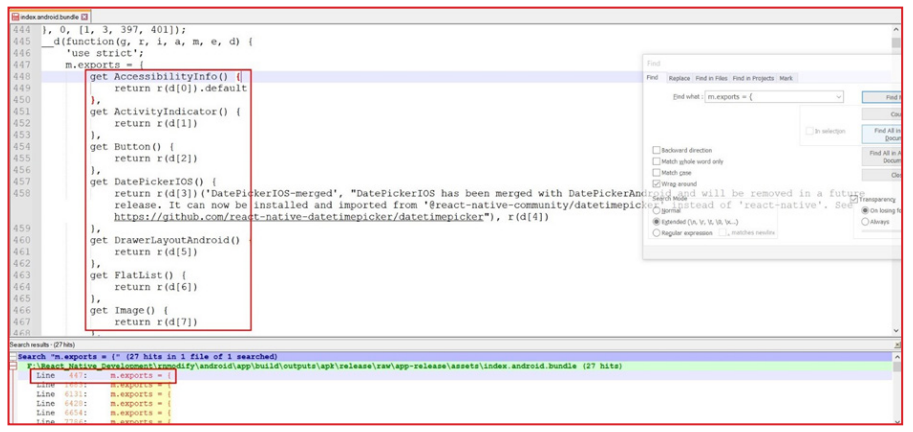
- We can see the list of pre-installed npm modules in the “m.export” array.
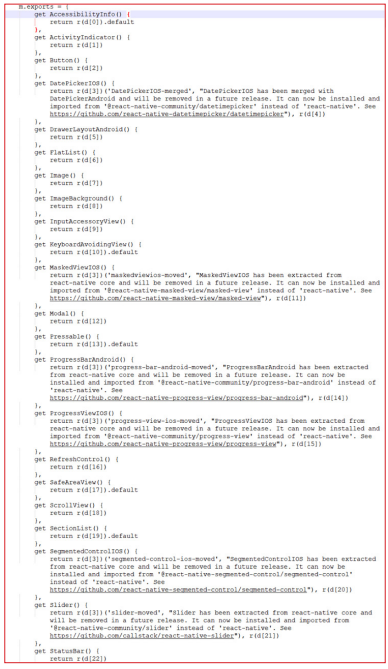
2. Manually installed:
- Contrary to the pre-installed npm packages, manually installed npm packages are installed manually during the development phase of the React Native application. This means these packages are not pre-installed when React Native application creation is initialized.
- These packages are created and released by awesome community members in React Native, which can be found on “npmjs.com”
- As mentioned above, manually installed packages are installed during a product’s development phase, or the application team may install a single package or a number of packages at their convenience.
- For example,
- “Stark Technologies” wanted to implement root detection in their React Native application. Thus, they may use the “jail-monkey” package.
- “Pym Technologies” wanted to implement SSL pinning in their React Native application. Thus, they may use the “react-native-ssl-pinning” package.
- On the other hand, “S.H.I.E.D. technologies” wanted to implement both root detection and SSL pinning. Thus, they may use both the “jail-monkey” and “react-native-ssl-pinning” npm packages
- We can find these packages in “index.android.bundle” file with the following keyword: NativeModules
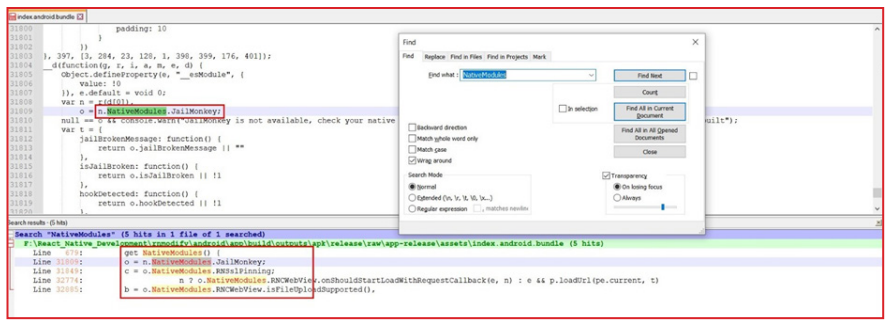
- Here, we can see we have manually installed and used 3 packages:
- JailMonkey, which is “jail-monkey”
- RNSslPinning, which is “react-native-ssl-pinning”
- RNCWebView, which is “react-native-webview”
Searching for any known CVE’s or vulnerabilities on found packages:
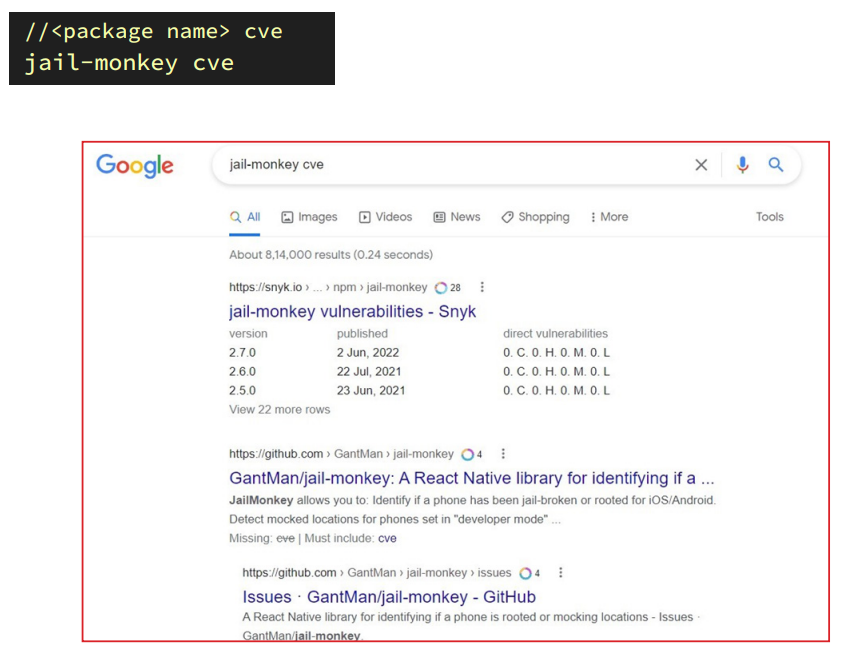
1. Once we identify the list of packages, we can search for more information on these packages with the following example keyword:
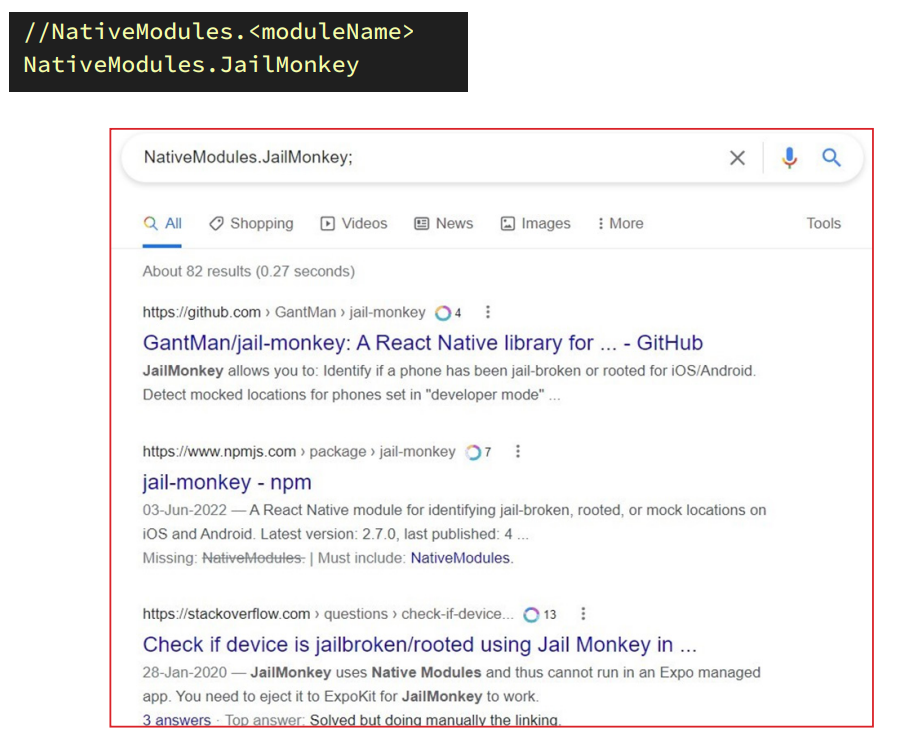
2. Unfortunately, there is no way to identify the version details of these packages used in vulnerable React Native applications. However, we can search for any known CVE or vulnerabilities or open issues for the npm package we found in the application:
React Native npm package CVEs walkthrough
React Native applications are built using multiple npm modules. Some are officially released and maintained by Facebook, but some are created by community members. We will review some of the zero-day vulnerabilities identified in npm packages specifically used to build some components of React Native applications.
1. CVE-2020-6506 Android WebView Universal Cross-site Scripting
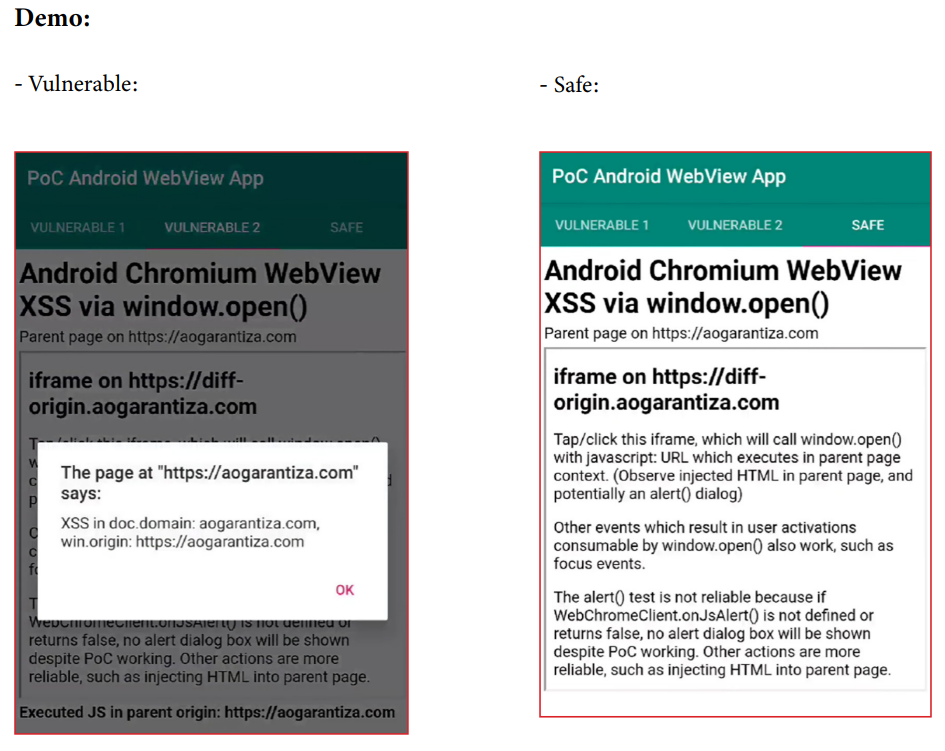
A universal XSS (cross-site scripting) vulnerability has been identified in the Android WebView system component. The “react-native-webview” npm package, which is used for the webview component in React Native applications, is also affected as it utilizes the same component for WebView implementation. This component allows cross-origin iframes to execute arbitrary JavaScript.
This UXSS vulnerability affects React Native applications that use a “react-native-webview” npm package that allows navigation to arbitrary URLs. When that app runs on systems with an Android WebView version before 83.0.4103.106,
Affected npm package: react-native-webview
Affected version: 10.0.0 or below
Description:
- In the WebView component in React Native applications, setSupportMultipleWindows is used to handle new windows with JavaScript: URLs in the same way as new windows with https:// URLs, which is to navigate the top document to the provided URL. This leads to JavaScript being executed in the top document context.
- To exploit this issue, an iframe can be called Windows. open () with javascript: url>. Successful exploitation of this attack requires user interaction, such as tapping, clicking, or keypressing, because WebView requires interaction to open a new window.
Mitigation:
- Ensure users update their Android WebView system component via the Google Play Store to 83.0.4103.106 or higher to avoid this UXSS. ‘react-native-webview’ is working on mitigation, but it could take some time.
Read more:
2. CVE-2020-7696 Information Exposure Affecting react-native-fast-image
- The “react-native-fast-image” npm package is an image processing component which improves the image processing ability of a React Native application. It reduces Flickering, Cache misses, improves performance loading from cache and performance in general.
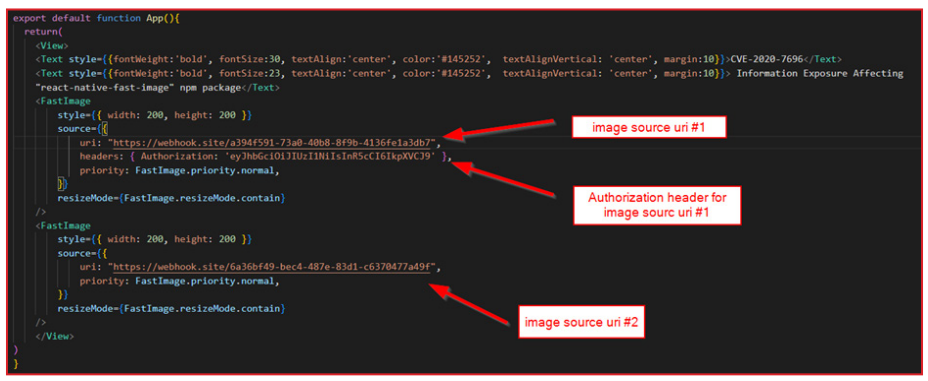
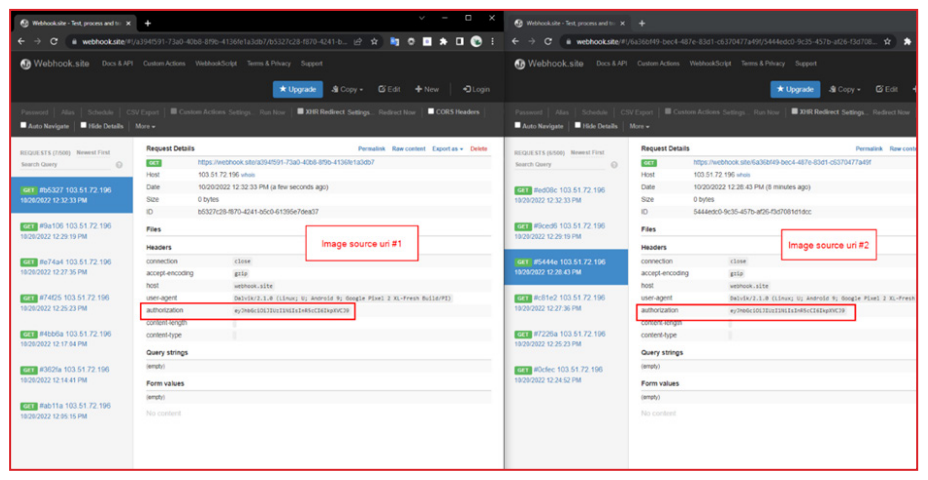
- The affected version of this package has been vulnerable to information exposure while rendering the image from uri. When an image with source={{uri: “…”, headers: { host: “[somehost.com](<http://somehost.com/>)”, authorization: “…” }} is loaded, all other subsequent images will use the same headers. Thus, authorization tokens, cookies or any sort of headers will be leaked to the servers of subsequent images.
Affected npm package: react-native-fast-image
Affected version: 8.2.2 or below
Demo:
React Native Code:
Call-back listener uri:
Mitigation:
- Upgrade “react-native-fast-image” to version 8.3.0 or higher.
Reference:
https://www.cve.org/CVERecord?id=CVE-2020-7696
https://security.snyk.io/vuln/SNYK-JS-REACTNATIVEFASTIMAGE-572228
Final Thoughts:
In the past few years, we have seen a huge expansion of new technologies in mobile application development. While it is hard to keep up with everything going at a “mach-10” speed, it is important to figure out the differences between the technologies to hit hard at the weakest link within them. The React Native framework is evolving with full thrust due to Facebook and the support of a strong community. So, it becomes crucial to identify the pain points of this framework.


Talk to a security researcher
This is the default text value


