
Token Stealing with Windows Update KB4054518



.png)


Key Takeaways
- Windows access tokens define the security context and privileges available to users, groups, and processes.
- A process does not necessarily receive every privilege belonging to its associated user account.
- Privileges can appear as disabled, enabled, or enabled-by-default in tools such as Process Explorer.
- AdjustTokenPrivileges can enable or disable existing privileges but cannot add new privileges.
- CreateRestrictedToken can remove privileges from a token.
- DuplicateTokenEx can convert an impersonation token into a primary token.
- Token stealing can be used to obtain the security context of a highly privileged SYSTEM process.
Tokens, Accounts, Processes:
On a Windows system, there are various user accounts, some are default to Windows and some are created explicitly. Some of the default user accounts are Local Service, Network Service and so on. Apart from user accounts there are also groups like Users, Everyone etc.
Using AccessChk [2] privileges for any user / group can be listed, as shown –
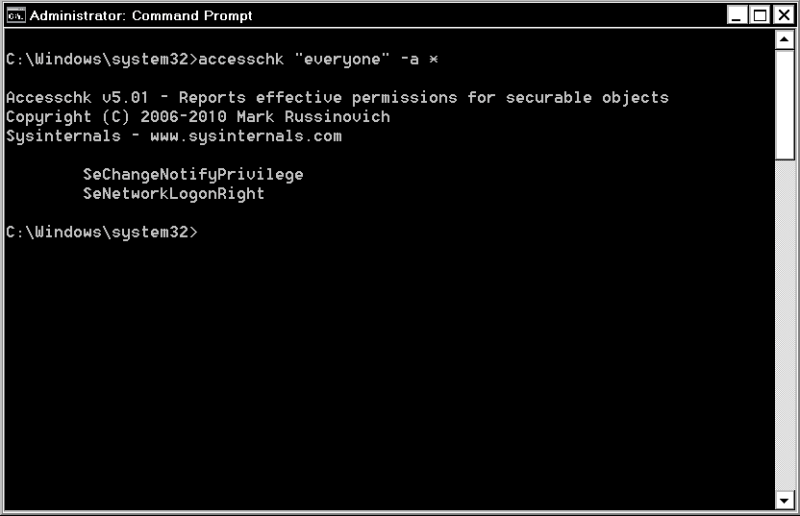
Showing privileges for the Everyone group
Each user account and group on Windows has a predefined set of privileges assigned. The operating system (OS) maintains an access token [1] for each user account and group. This access token describes a security context which contains information about privileges held by a user or a group.
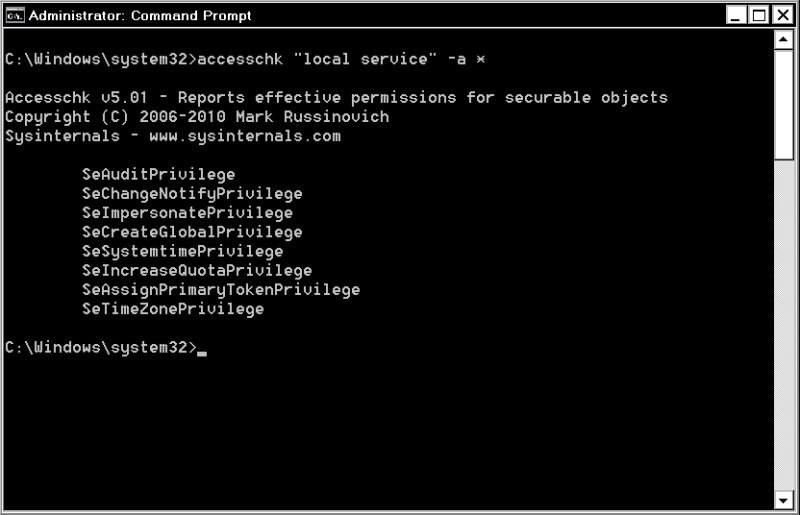
Showing privileges for the LOCAL SERVICE account
A process is a piece of code contained in a binary file that is in execution state.
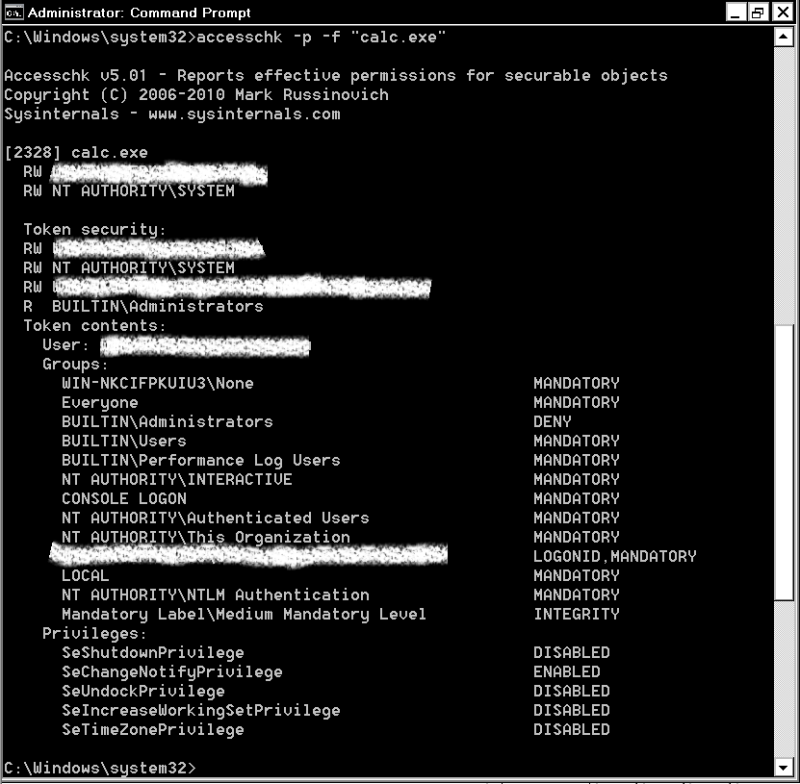
Showing various privileges for a normal process
Every process on Windows is owned by a user. At process creation time, OS creates a copy of access token belonging to that particular user and assigns it to the process. This token copy may or may not contain all the privileges of that user account and those that are present identify the privileges for that process.
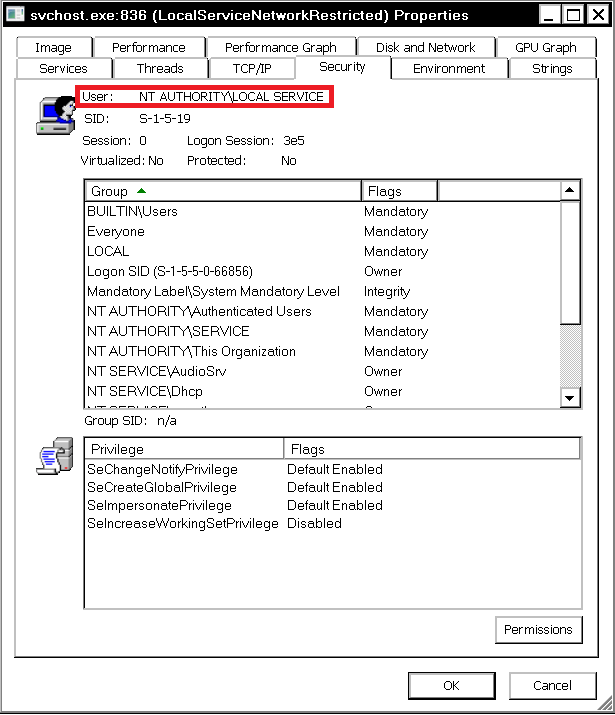
Showing various privileges for a svchost.exe executing with LOCAL SERVICE user
As seen from Process Explorer [3], privileges are disabled, enabled or enabled-by-default. Here, disabled does not mean that the privilege does not exist, rather it means that process has that privilege but it is not required. Similarly, enabled or enabled-by-default means the privilege exists and is required. Also, comparing list of privileges for a process with those of the associated user account, it can be seen that not all privileges are present.
Few APIs for Token manipulation:
a. AdjustTokenPrivileges: Enable or disable (but not add or remove) privileges b. CreateRestrictedToken: Remove privileges c. CreateProcessAsUser: Create a process in the security context of the user represented by the specified token d. CreateProcessWithToken: Create a process in the security context of the specified token e. DuplicateTokenEx: Convert impersonation token to primary
Here it is important to note the differences in CreateProcessAsUser and CreateProcessWithToken – the former assigns a token with all privileges of associated user account while for the later case, only those privileges are assigned which were present in source token. Also, there is no user mode API for adding a privilege.
There are techniques by which privileges for a target process can be elevated. One method is by directly manipulating the token assigned to a particular process from kernel mode and another method is to copy (or steal) the entire token assigned to a high privileged process (preferably one which executes as SYSTEM user). The later is also known as token stealing or token kidnapping.
Web Proxy Auto Discovery Protocol:
As explained in [4], JavaScript (JS) can be triggered from Web Proxy Auto Discovery (WPAD) service (WinHttpAutoProxySvc) in Windows. The technique mentioned in [4], triggers a JS exploit inside the WPAD service to drop and execute a binary as LOCAL SERVICE user with System integrity level. This binary contains another exploit, using which it can steal the token of SYSTEM user and spawn an arbitrary process by using the CreateProcessWithToken API which requires SE_IMPERSONATE_NAME privilege.
But the above method requires multiple exploits to be triggered. Also, even though System integrity level is obtained, as noted above using CreateProcessWithToken can actually grant a reduced set of privileges. To gain privilege escalation from JS exploit itself would be much more reliable and efficient. Following sequence of operations can be carried out to gain privilege escalation from JS itself: a. Gain code execution b. Find a SYSTEM token in WinHttpAutoProxySvc c. Convert from impersonation to primary by using DuplicateTokenEx d. Use CreateProcessAsUser to spawn a new process with the stolen primary token (note the use of CreateProcessAsUser and not CreateProcessWithToken)
For above sequence to work, SE_IMPERSONATE_NAME and SE_ASSIGNPRIMARYTOKEN_NAME privileges must be present for svchost.exe. As can be verified using either AccessChk or Process Explorer, and as illustrated in [4], SE_IMPERSONATE_NAME is present but SE_ASSIGNPRIMARYTOKEN_NAME is not present!!
This problem arises only for a system which is not sufficiently updated.
Update KB4054518:
This is a monthly rollup and was released on 12 December, 2017. According to Security Update Guide [5], issues in Microsoft Internet explorer, Microsoft Edge and Chakracore among other things are fixed in KB4054518. It can be installed as part of Windows Update or a standalone installer is available [6].
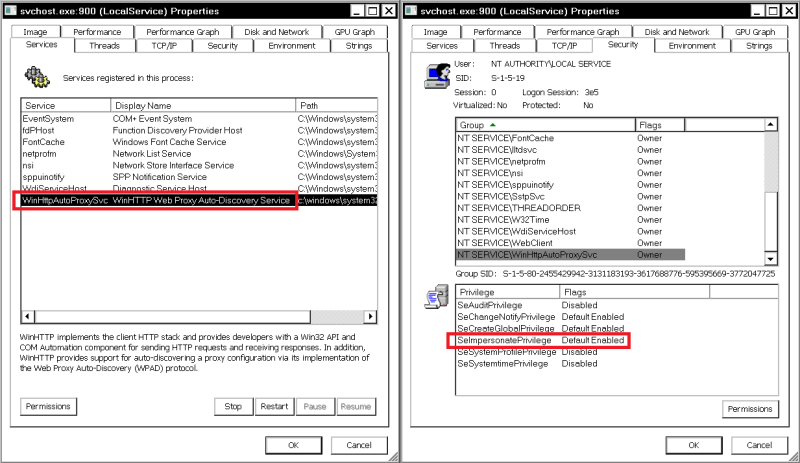
Before KB4054518 with only SE_IMPERSONATE_NAME for WinHttpAutoProxySvc
After installing this update, svchost.exe for WinHttpAutoProxySvc has the required SE_IMPERSONATE_NAME and SE_ASSIGNPRIMARYTOKEN_NAME privileges. Below images illustrate this.
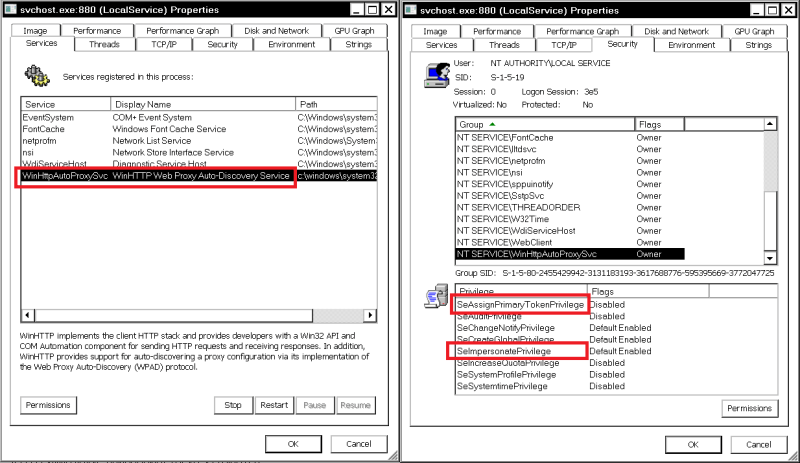
After KB4054518 with SE_IMPERSONATE_NAME and SE_ASSIGNPRIMARYTOKEN_NAME for WinHttpAutoProxySvc
So while fixing other issues, this update also enables an attacker to gain all privileges of SYSTEM account with just one JS exploit which can be triggered with or without browser using WPAD [4]. But since KB4054518 is for Windows 7 Service Pack 1, above sequence will not work for Windows 7 Service Pack 0.
[1] https://docs.microsoft.com/en-us/windows/desktop/secauthz/access-tokens
[2] https://docs.microsoft.com/en-us/sysinternals/downloads/accesschk
[3] https://docs.microsoft.com/en-us/sysinternals/downloads/process-explorer
[4] https://googleprojectzero.blogspot.com/2017/12/apacolypse-now-exploiting-windows-10-in_18.html
[6] https://support.microsoft.com/en-in/help/4054518/windows-7-update-kb4054518


Questions Web Application teams ask us.
Keep Reading
.png)




We break browsers before someone else does
This is the default text value

