
Kubectl Fields Plugin



.png)


Key Takeaways
- Kubernetes configuration fields must follow the correct parent-child hierarchy.
- kubectl explain --recursive provides detailed resource structures but can produce very large outputs.
- Using grep helps find a field but may not reveal its complete hierarchy.
- The kubectl-fields plugin directly displays the full hierarchical path of matching fields.
- It can identify the same field across multiple Kubernetes objects, such as containers and init containers.
- The plugin is available through the Krew kubectl plugin manager.
Introduction to Kubernetes
Kubernetes is an open-source container orchestration system for automating application deployment, scaling, and management. kubectl provides a CLI interface to manage Kubernetes clusters. Kubectl enables the users to run different operations like describe, edit, exec, explain, logs, run, etc on Kubernetes clusters.
Kubernetes objects can be created, updated, and deleted by writing object configuration files either in declarative/imperative method. Kubernetes object configuration files need to follow a pre-defined parental hierarchy structure. All the configuration files need to be addressed in the same pre-defined sequential/parental order to get processed by Kubernetes.
The kubectl CLI has an extended feature called kubectl plugins – this advanced feature allows the users to develop plugins to customize kubectl for personal use.
This blog post focuses on one such plugin authored by us, which saves a lot of developers and users time while writing or editing Kubernetes object configuration files.
kubectl-fields plugin
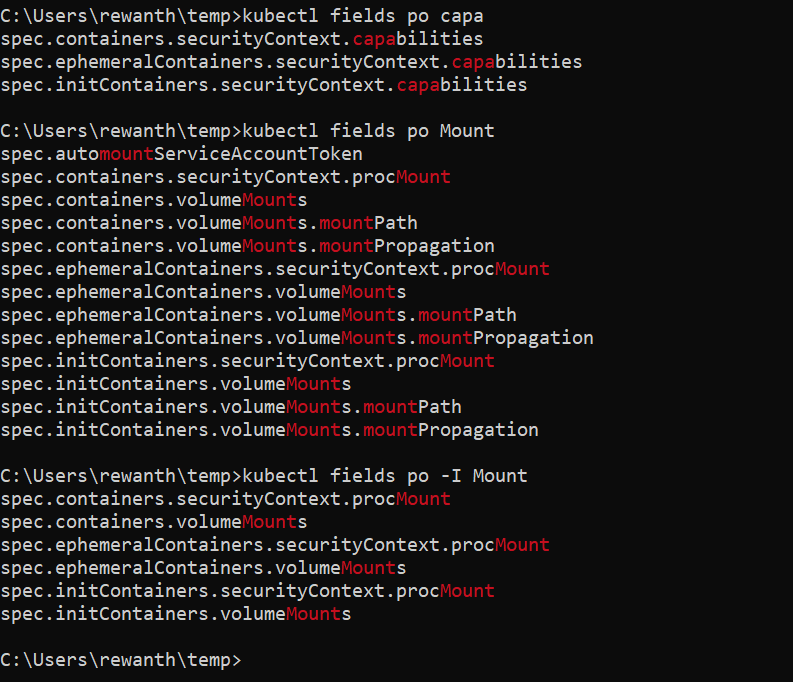
kubectl explain --recursive | grep doesn’t show the exact hierarchy of matched fields, but this plugin does! You can use it to dump a one-liner parental hierarchy of all matching fields in any kubectl resource.
In-depth explanation
Let’s say you need to add the capabilities field to the pods configuration file. To achieve this, the first thing is to have the knowledge of the capabilities hierarchy to place that in the object configuration file.
The current methodology to find a hierarchical order for any field is to use grep or similar command for the specific field.
rewanth@ubuntu:~/go/src/kubectl-fields$ kubectl explain --recursive po.spec | grep capabilities
         capabilities   <Object>
         capabilities   <Object>
The above result shows only the matched patterns but it doesn’t show the parental hierarchy. Alternatively, the search can be extended with grep advanced functionalities.
rewanth@ubuntu:~/go/src/kubectl-fields$ kubectl explain --recursive po.spec | grep capabilities -C 5
      resources <Object>
         limits <map[string]string>
         requests       <map[string]string>
      securityContext   <Object>
         allowPrivilegeEscalation       <boolean>
         capabilities   <Object>
            add <[]string>
            drop        <[]string>
         privileged     <boolean>
         procMount      <string>
         readOnlyRootFilesystem <boolean>
--
      resources <Object>
         limits <map[string]string>
         requests       <map[string]string>
      securityContext   <Object>
         allowPrivilegeEscalation       <boolean>
         capabilities   <Object>
            add <[]string>
            drop        <[]string>
         privileged     <boolean>
         procMount      <string>
         readOnlyRootFilesystem <boolean>
Even the above grep command doesn’t show the complete hierarchy for capabilities.
The only way to find the hierarchy is to print the complete output, scroll up and down to find the parent/child elements.
rewanth@ubuntu:~/go/src/kubectl-fields$ kubectl explain --recursive po.spec
KIND: Pod
VERSION: v1
RESOURCE: spec <Object>
DESCRIPTION:
Specification of the desired behavior of the pod. More info:
https://git.k8s.io/community/contributors/devel/api-conventions.md#spec-and-status
PodSpec is a description of a pod.
FIELDS:
activeDeadlineSeconds <integer>
affinity <Object>
nodeAffinity <Object>
preferredDuringSchedulingIgnoredDuringExecution <[]Object>
preference <Object>
matchExpressions <[]Object>
key <string>
operator <string>
values <[]string>
matchFields <[]Object>
key <string>
operator <string>
values <[]string>
weight <integer>
requiredDuringSchedulingIgnoredDuringExecution <Object>
nodeSelectorTerms <[]Object>
matchExpressions <[]Object>
key <string>
operator <string>
values <[]string>
matchFields <[]Object>
key <string>
operator <string>
values <[]string>
podAffinity <Object>
preferredDuringSchedulingIgnoredDuringExecution <[]Object>
podAffinityTerm <Object>
labelSelector <Object>
matchExpressions <[]Object>
key <string>
operator <string>
values <[]string>
matchLabels <map[string]string>
namespaces <[]string>
topologyKey <string>
weight <integer>
requiredDuringSchedulingIgnoredDuringExecution <[]Object>
labelSelector <Object>
matchExpressions <[]Object>
key <string>
operator <string>
values <[]string>
matchLabels <map[string]string>
namespaces <[]string>
topologyKey <string>
podAntiAffinity <Object>
preferredDuringSchedulingIgnoredDuringExecution <[]Object>
podAffinityTerm <Object>
labelSelector <Object>
matchExpressions <[]Object>
key <string>
operator <string>
values <[]string>
matchLabels <map[string]string>
namespaces <[]string>
topologyKey <string>
weight <integer>
requiredDuringSchedulingIgnoredDuringExecution <[]Object>
labelSelector <Object>
matchExpressions <[]Object>
key <string>
operator <string>
values <[]string>
matchLabels <map[string]string>
namespaces <[]string>
topologyKey <string>
automountServiceAccountToken <boolean>
containers <[]Object>
args <[]string>
command <[]string>
env <[]Object>
name <string>
value <string>
valueFrom <Object>
configMapKeyRef <Object>
key <string>
name <string>
optional <boolean>
fieldRef <Object>
apiVersion <string>
fieldPath <string>
resourceFieldRef <Object>
containerName <string>
divisor <string>
resource <string>
secretKeyRef <Object>
key <string>
name <string>
optional <boolean>
envFrom <[]Object>
configMapRef <Object>
name <string>
optional <boolean>
prefix <string>
secretRef <Object>
name <string>
optional <boolean>
image <string>
imagePullPolicy <string>
lifecycle <Object>
postStart <Object>
exec <Object>
command <[]string>
httpGet <Object>
host <string>
httpHeaders <[]Object>
name <string>
value <string>
path <string>
port <string>
scheme <string>
tcpSocket <Object>
host <string>
port <string>
preStop <Object>
exec <Object>
command <[]string>
httpGet <Object>
host <string>
httpHeaders <[]Object>
name <string>
value <string>
path <string>
port <string>
scheme <string>
tcpSocket <Object>
host <string>
port <string>
livenessProbe <Object>
exec <Object>
command <[]string>
failureThreshold <integer>
httpGet <Object>
host <string>
httpHeaders <[]Object>
name <string>
value <string>
path <string>
port <string>
scheme <string>
initialDelaySeconds <integer>
periodSeconds <integer>
successThreshold <integer>
tcpSocket <Object>
host <string>
port <string>
timeoutSeconds <integer>
name <string>
ports <[]Object>
containerPort <integer>
hostIP <string>
hostPort <integer>
name <string>
protocol <string>
readinessProbe <Object>
exec <Object>
command <[]string>
failureThreshold <integer>
httpGet <Object>
host <string>
httpHeaders <[]Object>
name <string>
value <string>
path <string>
port <string>
scheme <string>
initialDelaySeconds <integer>
periodSeconds <integer>
successThreshold <integer>
tcpSocket <Object>
host <string>
port <string>
timeoutSeconds <integer>
resources <Object>
limits <map[string]string>
requests <map[string]string>
securityContext <Object>
allowPrivilegeEscalation <boolean>
capabilities <Object>
add <[]string>
drop <[]string>
privileged <boolean>
procMount <string>
readOnlyRootFilesystem <boolean>
runAsGroup <integer>
runAsNonRoot <boolean>
runAsUser <integer>
seLinuxOptions <Object>
level <string>
role <string>
type <string>
user <string>
windowsOptions <Object>
gmsaCredentialSpec <string>
gmsaCredentialSpecName <string>
stdin <boolean>
stdinOnce <boolean>
terminationMessagePath <string>
terminationMessagePolicy <string>
tty <boolean>
volumeDevices <[]Object>
devicePath <string>
name <string>
volumeMounts <[]Object>
mountPath <string>
mountPropagation <string>
name <string>
readOnly <boolean>
subPath <string>
subPathExpr <string>
workingDir <string>
dnsConfig <Object>
nameservers <[]string>
options <[]Object>
name <string>
value <string>
searches <[]string>
dnsPolicy <string>
enableServiceLinks <boolean>
hostAliases <[]Object>
hostnames <[]string>
ip <string>
hostIPC <boolean>
hostNetwork <boolean>
hostPID <boolean>
hostname <string>
imagePullSecrets <[]Object>
name <string>
initContainers <[]Object>
args <[]string>
command <[]string>
env <[]Object>
name <string>
value <string>
valueFrom <Object>
configMapKeyRef <Object>
key <string>
name <string>
optional <boolean>
fieldRef <Object>
apiVersion <string>
fieldPath <string>
resourceFieldRef <Object>
containerName <string>
divisor <string>
resource <string>
secretKeyRef <Object>
key <string>
name <string>
optional <boolean>
envFrom <[]Object>
configMapRef <Object>
name <string>
optional <boolean>
prefix <string>
secretRef <Object>
name <string>
optional <boolean>
image <string>
imagePullPolicy <string>
lifecycle <Object>
postStart <Object>
exec <Object>
command <[]string>
httpGet <Object>
host <string>
httpHeaders <[]Object>
name <string>
value <string>
path <string>
port <string>
scheme <string>
tcpSocket <Object>
host <string>
port <string>
preStop <Object>
exec <Object>
command <[]string>
httpGet <Object>
host <string>
httpHeaders <[]Object>
name <string>
value <string>
path <string>
port <string>
scheme <string>
tcpSocket <Object>
host <string>
port <string>
livenessProbe <Object>
exec <Object>
command <[]string>
failureThreshold <integer>
httpGet <Object>
host <string>
httpHeaders <[]Object>
name <string>
value <string>
path <string>
port <string>
scheme <string>
initialDelaySeconds <integer>
periodSeconds <integer>
successThreshold <integer>
tcpSocket <Object>
host <string>
port <string>
timeoutSeconds <integer>
name <string>
ports <[]Object>
containerPort <integer>
hostIP <string>
hostPort <integer>
name <string>
protocol <string>
readinessProbe <Object>
exec <Object>
command <[]string>
failureThreshold <integer>
httpGet <Object>
host <string>
httpHeaders <[]Object>
name <string>
value <string>
path <string>
port <string>
scheme <string>
initialDelaySeconds <integer>
periodSeconds <integer>
successThreshold <integer>
tcpSocket <Object>
host <string>
port <string>
timeoutSeconds <integer>
resources <Object>
limits <map[string]string>
requests <map[string]string>
securityContext <Object>
allowPrivilegeEscalation <boolean>
capabilities <Object>
add <[]string>
drop <[]string>
privileged <boolean>
procMount <string>
readOnlyRootFilesystem <boolean>
runAsGroup <integer>
runAsNonRoot <boolean>
runAsUser <integer>
seLinuxOptions <Object>
level <string>
role <string>
type <string>
user <string>
windowsOptions <Object>
gmsaCredentialSpec <string>
gmsaCredentialSpecName <string>
stdin <boolean>
stdinOnce <boolean>
terminationMessagePath <string>
terminationMessagePolicy <string>
tty <boolean>
volumeDevices <[]Object>
devicePath <string>
name <string>
volumeMounts <[]Object>
mountPath <string>
mountPropagation <string>
name <string>
readOnly <boolean>
subPath <string>
subPathExpr <string>
workingDir <string>
nodeName <string>
nodeSelector <map[string]string>
preemptionPolicy <string>
priority <integer>
priorityClassName <string>
readinessGates <[]Object>
conditionType <string>
restartPolicy <string>
runtimeClassName <string>
schedulerName <string>
securityContext <Object>
fsGroup <integer>
runAsGroup <integer>
runAsNonRoot <boolean>
runAsUser <integer>
seLinuxOptions <Object>
level <string>
role <string>
type <string>
user <string>
supplementalGroups <[]integer>
sysctls <[]Object>
name <string>
value <string>
windowsOptions <Object>
gmsaCredentialSpec <string>
gmsaCredentialSpecName <string>
serviceAccount <string>
serviceAccountName <string>
shareProcessNamespace <boolean>
subdomain <string>
terminationGracePeriodSeconds <integer>
tolerations <[]Object>
effect <string>
key <string>
operator <string>
tolerationSeconds <integer>
value <string>
volumes <[]Object>
awsElasticBlockStore <Object>
fsType <string>
partition <integer>
readOnly <boolean>
volumeID <string>
azureDisk <Object>
cachingMode <string>
diskName <string>
diskURI <string>
fsType <string>
kind <string>
readOnly <boolean>
azureFile <Object>
readOnly <boolean>
secretName <string>
shareName <string>
cephfs <Object>
monitors <[]string>
path <string>
readOnly <boolean>
secretFile <string>
secretRef <Object>
name <string>
user <string>
cinder <Object>
fsType <string>
readOnly <boolean>
secretRef <Object>
name <string>
volumeID <string>
configMap <Object>
defaultMode <integer>
items <[]Object>
key <string>
mode <integer>
path <string>
name <string>
optional <boolean>
csi <Object>
driver <string>
fsType <string>
nodePublishSecretRef <Object>
name <string>
readOnly <boolean>
volumeAttributes <map[string]string>
downwardAPI <Object>
defaultMode <integer>
items <[]Object>
fieldRef <Object>
apiVersion <string>
fieldPath <string>
mode <integer>
path <string>
resourceFieldRef <Object>
containerName <string>
divisor <string>
resource <string>
emptyDir <Object>
medium <string>
sizeLimit <string>
fc <Object>
fsType <string>
lun <integer>
readOnly <boolean>
targetWWNs <[]string>
wwids <[]string>
flexVolume <Object>
driver <string>
fsType <string>
options <map[string]string>
readOnly <boolean>
secretRef <Object>
name <string>
flocker <Object>
datasetName <string>
datasetUUID <string>
gcePersistentDisk <Object>
fsType <string>
partition <integer>
pdName <string>
readOnly <boolean>
gitRepo <Object>
directory <string>
repository <string>
revision <string>
glusterfs <Object>
endpoints <string>
path <string>
readOnly <boolean>
hostPath <Object>
path <string>
type <string>
iscsi <Object>
chapAuthDiscovery <boolean>
chapAuthSession <boolean>
fsType <string>
initiatorName <string>
iqn <string>
iscsiInterface <string>
lun <integer>
portals <[]string>
readOnly <boolean>
secretRef <Object>
name <string>
targetPortal <string>
name <string>
nfs <Object>
path <string>
readOnly <boolean>
server <string>
persistentVolumeClaim <Object>
claimName <string>
readOnly <boolean>
photonPersistentDisk <Object>
fsType <string>
pdID <string>
portworxVolume <Object>
fsType <string>
readOnly <boolean>
volumeID <string>
projected <Object>
defaultMode <integer>
sources <[]Object>
configMap <Object>
items <[]Object>
key <string>
mode <integer>
path <string>
name <string>
optional <boolean>
downwardAPI <Object>
items <[]Object>
fieldRef <Object>
apiVersion <string>
fieldPath <string>
mode <integer>
path <string>
resourceFieldRef <Object>
containerName <string>
divisor <string>
resource <string>
secret <Object>
items <[]Object>
key <string>
mode <integer>
path <string>
name <string>
optional <boolean>
serviceAccountToken <Object>
audience <string>
expirationSeconds <integer>
path <string>
quobyte <Object>
group <string>
readOnly <boolean>
registry <string>
tenant <string>
user <string>
volume <string>
rbd <Object>
fsType <string>
image <string>
keyring <string>
monitors <[]string>
pool <string>
readOnly <boolean>
secretRef <Object>
name <string>
user <string>
scaleIO <Object>
fsType <string>
gateway <string>
protectionDomain <string>
readOnly <boolean>
secretRef <Object>
name <string>
sslEnabled <boolean>
storageMode <string>
storagePool <string>
system <string>
volumeName <string>
secret <Object>
defaultMode <integer>
items <[]Object>
key <string>
mode <integer>
path <string>
optional <boolean>
secretName <string>
storageos <Object>
fsType <string>
readOnly <boolean>
secretRef <Object>
name <string>
volumeName <string>
volumeNamespace <string>
vsphereVolume <Object>
fsType <string>
storagePolicyID <string>
storagePolicyName <string>
volumePath <string>This is a tedious job and consumes a lot of time. If there are multiple matching fields in different objects, that will make the situation worse.
We provide a solution, an alternative approach to this problem. kubectl fields plugin solves this problem by printing one-liner parental hierarchy of any field in any selected resource.
rewanth@ubuntu:~/go/src/kubectl-fields$ kubectl fields po.spec capabilities
containers.securityContext.capabilities
initContainers.securityContext.capabilities
Conclusion
kubectl fields plugin is now integrated with krew, a kubectl plugin manager. This plugin integration works on all platforms. So, this plugin can be installed directly with krew. It’s as simple as,
kubectl krew install fieldsReferences
https://github.com/rewanth1997/kubectl-fields


Keep Reading
.png)




We break browsers before someone else does
This is the default text value

