
Is Your Captcha Really Secure?


.png)


Captcha is the challenge-solving test used in computing to distinguish between the human and machine. It is implemented as one of the security features to stop automation of any process. But what if any small piece of code is able to solve that challenge and is successful in impersonating the application that the form is been submitted by the human? While performing Web Application Security Assessment for different web application we came across many wrong implementations of Captcha being done by the developer. So here are some of the common mistakes made by the developer while implementing Captcha in your application:
- Using only numbers with a small length of string. The permutation and combination required to brute force the captcha will be less.
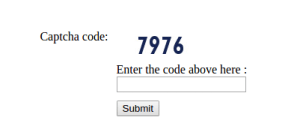
Here the length of string is 4. To brute force above string total number of tries will be 10*10*10*10=10000, which is very less.
- Using alphabets and numbers in string but length of string used is small. It will only increase the permutation and combination for brute forcing to a little more.
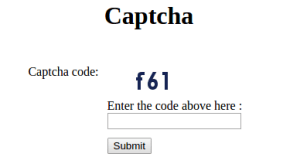
Total number of tries= 36*36*36= 46656
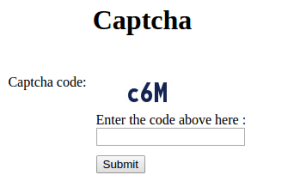
Total number of tries=62*62*62= 238328
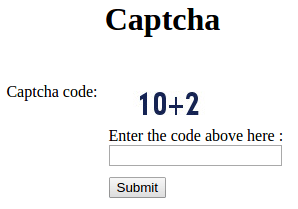
- Generating question with a format that can be automatically recognized, such as any math question.
- Rendering captcha code as an string(text) in the page, rather than rendering the image containing captcha string.
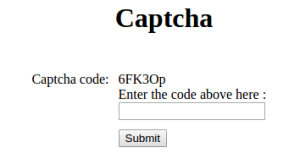
Attacker can write small piece of code to load the page and parse this text and then submit the form.
- Using an audio or visual image that does not have sufficient distortion from the unobfuscated source image.
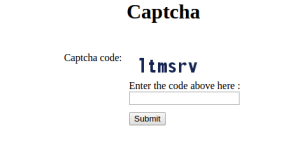
Since there is no distortion in the image, so the attacker can download the image and can try to extract the text from the image.
- Verifying captcha in client side only.
- Instead of validating captcha value, validating only if captcha is empty or not at server side.
Code Snippet:
// Server-side validation check
if (empty($_POST['captcha_code']) || empty($_POST['code'])) {
    // CAPTCHA verification failed
    $msg = "<span style='color: #ff1c19;'>The validation code does not match!</span>";
} else {
    // CAPTCHA verification successful
    $msg = "<span style='color: #4e802d;'>The validation code has been matched.</span>";
}- Implementing any weak logic which can be cracked and rendering the captcha code used to generate the string in the client side.
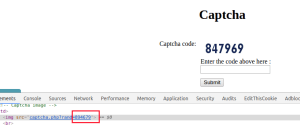
rand: 894679
captcha string: 847969
Logic: Making group of two groups of digit one at even places, other at odd places.
Even: 847 Odd: 969
Now combine both even and odd string will give the desired captcha
Captcha string: 847969
- Rendering the captcha code in client side and using the captcha-code coming from client side to validate the captcha.
Code Snippet:
// code for check server side validation
if (empty($_POST["captcha_code"]) || empty($_POST["code"])) {
    $msg = "<span style='color:#ff1c19'>The Validation code does not match!</span>"; // Captcha verification is incorrect.
} else {
    // Validating the user input with the captcha generated.
    // Algorithm used for captcha generation
    $captcha = $_POST["captcha_code"];
    $code = $_POST["code"];

    if (strcasecmp($captcha, $code) == 0)
        $msg = "<span style='color:#4e802d'>The Validation code has been matched.</span>"; // Captcha verification is Correct.
    else
        $msg = "<span style='color:#ff1c19'>The Validation code does not match!</span>"; // Captcha verification is incorrect.
}
}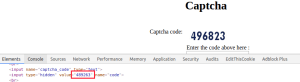
So the attacker do not need to access the page even for the code. The attacker can enter any similar string value in the “code” and “captcha_code” fields and submit the form.


Keep Reading
.png)




We break browsers before someone else does
This is the default text value

