
Firmware Visual Analysis Part-1


.png)


Key Takeaways
- Firmware analysis can reveal valuable information about embedded devices and their internal software.
- Visual inspection is particularly useful as an initial step when analysing unknown firmware images.
- Binary visualisation can expose patterns that may otherwise be difficult to identify from raw binary or hexadecimal data.
- Binwalk provides firmware analysis, extraction, and entropy visualisation capabilities.
- Bin2bmp converts binary data into graphical representations that make structural patterns easier to observe.
- pixd provides lightweight command-line binary visualisation using coloured representations of individual bytes.
- Visualisation alone is not a complete firmware-analysis solution and should be combined with other reverse-engineering techniques.
Introduction
Firmware analysis gives more understanding about the embedded device and what it contains.
It helps to,
- Identify vulnerabilities in the embedded device firmware.
- Improve product stability and resistance to attacks.
- Do security auditing
- Removal of copy protection
- Extend functionality
- Create backdoors
Use it for good, bad or ugly, firmware analysis is definitely fun.
How much data you’ll get just by looking at the visualisation of a binary file? Is that enough to compromise a system?
Sometimes the answer is yes.
Visual analysis is one of the efficient methods in firmware analysis, especially in case of unknown firmware images.
We could take a binary file, firmware image or virtually anything to do a visual analysis. Sometimes hard troubles can crack, just by looking into it with the right tools. We could even tell the CPU instruction set architecture from a visual analysis.
Tools
Binwalk
Binwalk is not just used for visual analysis. It’s a fast, easy to use tool for analysing, reverse engineering, and extracting firmware images. It is simple to use, fully scriptable, and can be easily extended via custom signatures, extraction rules, and plugin modules.
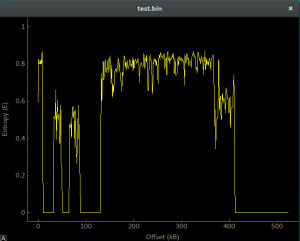
entropy analysis using binwalk
You can get it from https://github.com/devttys0/binwalk
Bin2bmp
This is a python script to visualise binary data in a graphical form. It’s really interesting to look at different types of files.

output of bin2bmp
You can get it from https://sourceforge.net/projects/bin2bmp/
pixd
If you prefer the command line way of getting things done, here you are. It visualises the binary file in a terminal emulator. Pretty useful if the file size is small.
pixd is a tool for visualising binary data using a colour palette. It is in a lot of ways akin to a hexdump tool, except using coloured squares to represent each octet. – from github
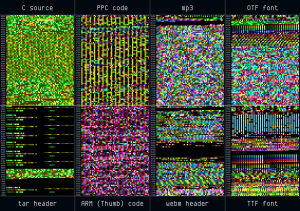
file fingerprints generated by pixd
You’ll get pixd from https://github.com/FireyFly/pixd
Conclusion
Visual inspection is a primary step, which could help you greatly. Although firmware visualisation can help you in various ways, It’s not a complete solution. To get more out of your firmware analysis you may have to combine it with other popular methods.
References
https://media.blackhat.com/us-13/US-13-Zaddach-Workshop-on-Embedded-Devices-Security-and-Firmware-Reverse-Engineering-WP.pdf
https://github.com/devttys0/binwalk/wiki
https://github.com/devttys0/binwalk/wiki/Quick-Start-Guide


Questions Web Application teams ask us.
Keep Reading
.png)




We break browsers before someone else does
This is the default text value

